[Mabinogi Mobile] Control settings tips for beginners!! Cut down on accidental taps and get a better look at your cute outfit
달냥
Hellooo~ (˶ˊꇴˋو(و ⁾⁾
It's your Nexon Picker, 달냥!
What's the first thing you change when you start a new game?
For me... controls first! If I can't get comfortable with the controls, playing feels awkward, and
I end up closing the game pretty quickly. So those are always the first settings I change!
If you're starting Mabinogi Mobile on your phone for the first time,
try turning off “Tap Empty Space to Attack” for combat, and switching the camera to “Manual” when you want to check out your outfits!
That way, slightly missing a skill button won't trigger an unwanted attack,
and you can admire your outfit from the angle you picked—even from behind—for as long as you like!!
Especially if you love dressing up your character and taking screenshots like I do!!!
You get the shot all lined up, only to have a nameplate floating right over your baby girl's head... Kind of a bummer, right? ㅠ
So~!! Today, whether you're fighting, wandering around town, or taking outfit pics, I've got some handy settings for each situation!
Let's go through three settings to try.
|
| Contents | |
|---|
|
① I tapped next to a skill button, so why am I attacking? |
|
② Turn around, baby girl—let's see that outfit! |
|
③ How to hide nameplates and buttons for outfit pics |
1. I tapped next to a skill button, so why am I attacking?
You definitely tapped the empty space next to a skill button, but your character used a basic attack??
There's nothing wrong with your character or your screen!
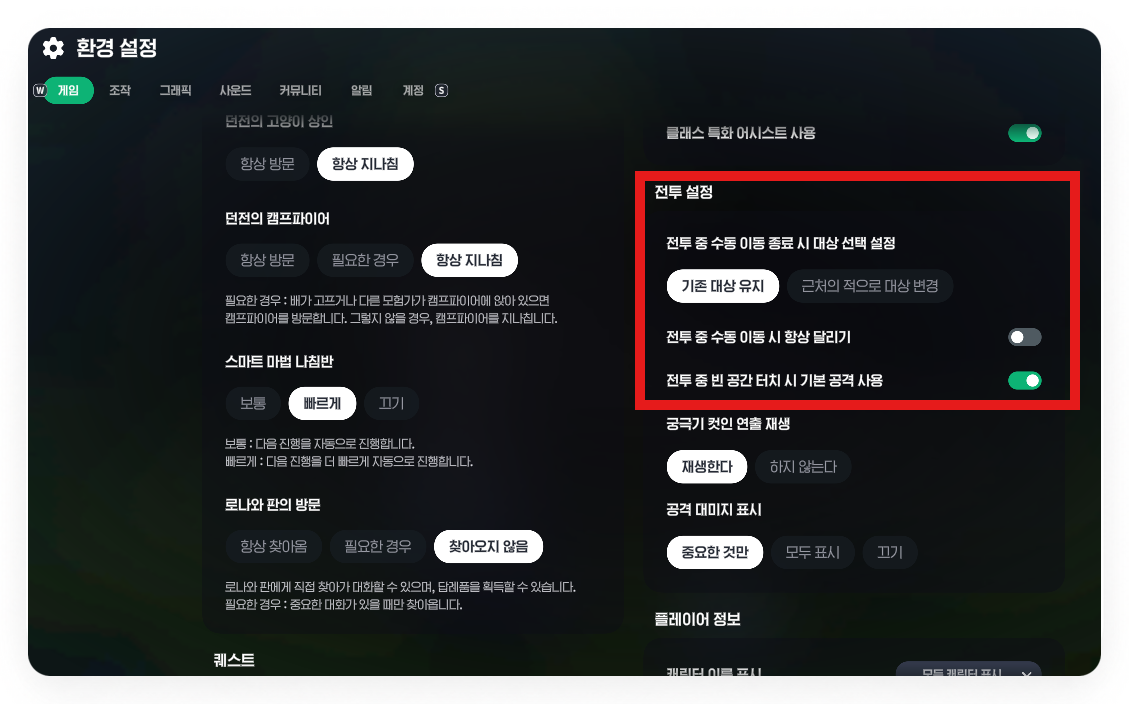
The setting to check is “Use Basic Attack When Tapping Empty Space During Combat”.
The name's a mouthful, but it does exactly what it says: during combat, tapping a spot without a button still counts as an attack input.
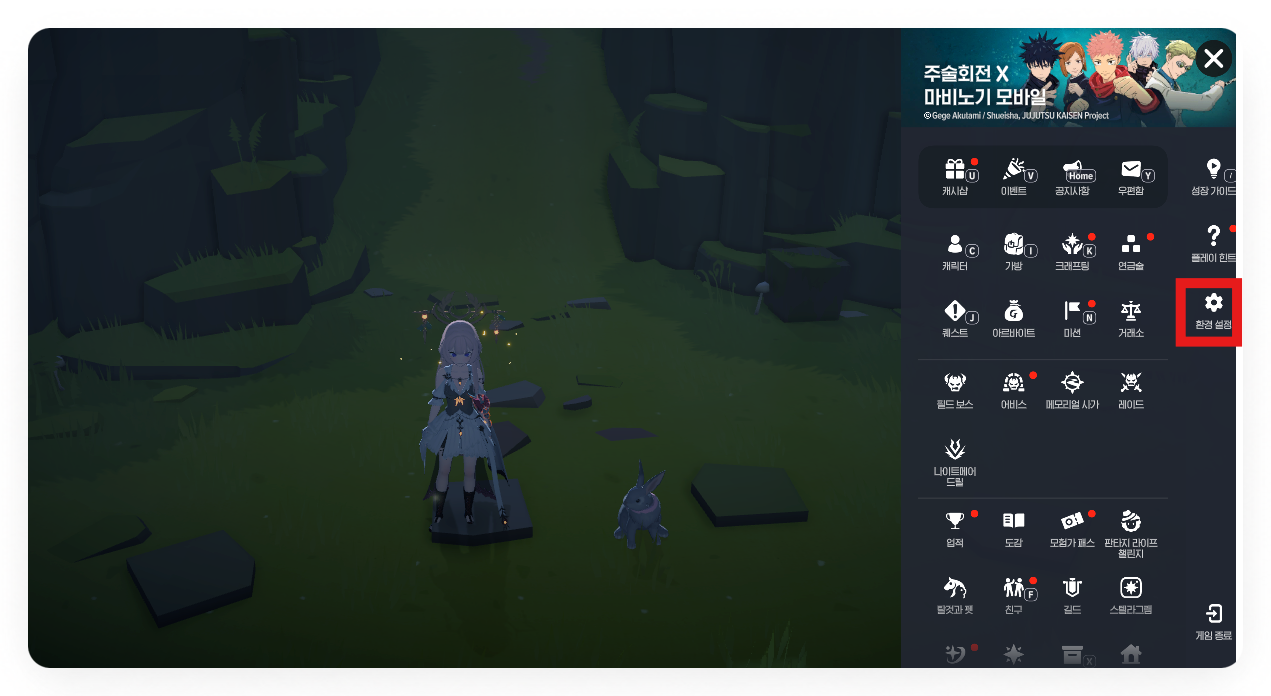
Open Menu (≡) in the top right → Settings, and try switching this option OFF.
|
How's your tapping in combat? |
Recommended setting |
|---|---|
|
I'm still learning where the skills are, so I often tap next to the buttons |
OFF |
|
Accidentally tapping an empty spot won't trigger a basic attack |
|
|
Finding and tapping that tiny attack button every time is more of a hassle |
ON |
|
You can tap an empty spot to use a basic attack |
I'd recommend starting with it OFF.
If you tap the empty space next to a skill in your next fight and think, “Wait, it'd actually be easier if tapping here attacked too,”
just turn it back on! ㅋㅋㅋ
You can switch it on or off anytime, so go with whatever feels comfortable!
2. Turn around, baby girl—let's see that outfit!
When you're following a quest, you just need a clear view of the road ahead. But once you've dressed your character in a new outfit, there's something else you want to know.
Okay... I've seen the front... So what does this outfit look like from behind?
Especially if you've paired long hair with a cute collar—don't you want to see how much of the collar the hair covers?
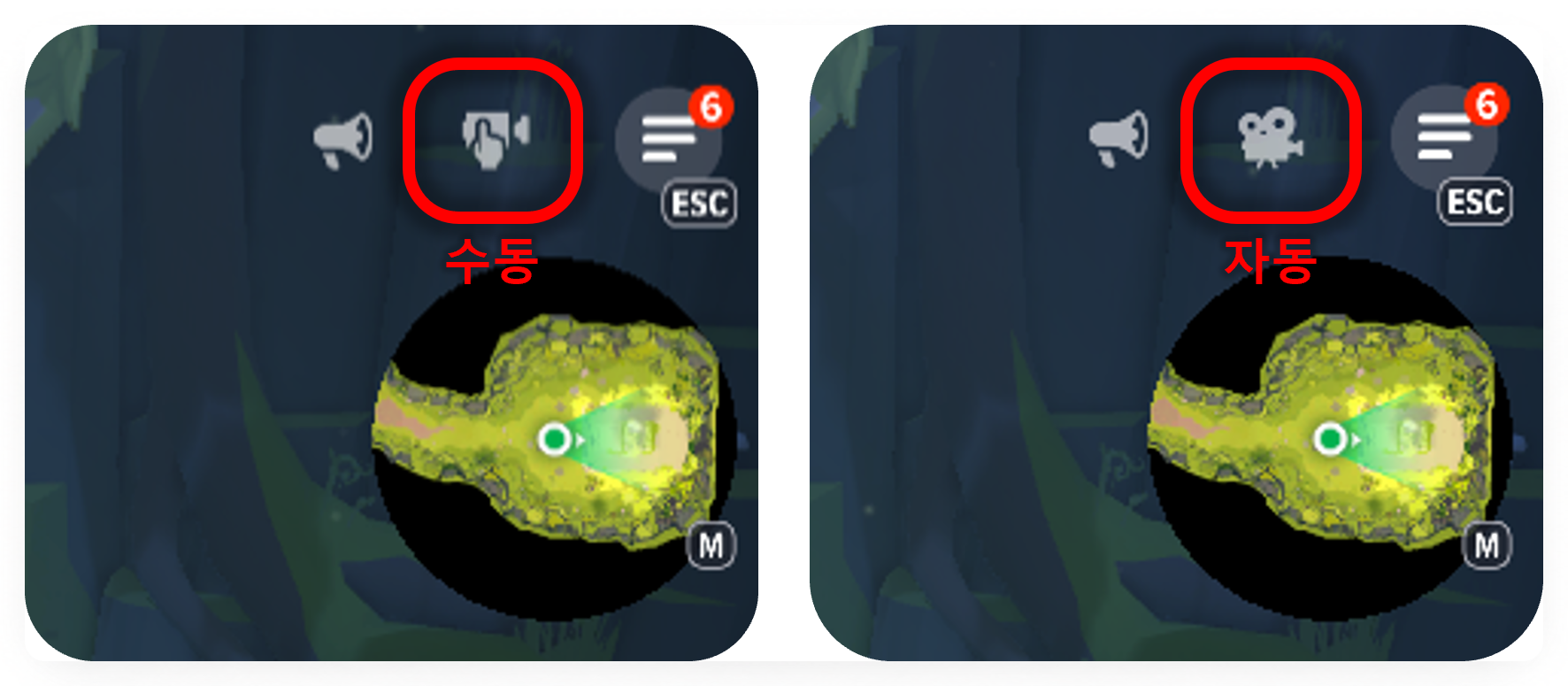 └ Camera icon in the top right of the main screen ┘
No need to go all the way into Settings for that! Just tap the camera icon in the top right of the main screen.
|
When you're... |
Camera setting |
|---|---|
|
Following a quest down an unfamiliar path |
Auto Camera |
|
The view adjusts to what's happening, so you don't have to fiddle with the camera as much |
|
|
Standing around town admiring your outfit |
Manual Camera |
|
Drag your finger across an empty part of the screen, and the camera will keep your chosen angle as much as possible |
The difference is easiest to notice when you take your finger off the screen.
You can drag to rotate the view and look from the side in Auto too, but that angle only lasts a moment...
If you want to line up a side view and take your time admiring the hair or outfit details, Manual Camera makes it easier!
3. How to hide nicknames and the camera UI for outfit pics
I love taking pics of the same outfit with different hairstyles and dye colors,
and since I mostly use them for blog posts and stuff, whenever my nickname or other players' nicknames show up,
I have to hide every single one, you know...? (They don't want theirs shown, and neither do I..;;)
I used to open Photoshop and painstakingly blur them all out, one by one...
or cover them with little black boxes I'd draw by hand in Paint..ㅎ .. (sniffle)
Plus, all that text floating around your character is surprisingly distracting when you're looking at the pics...!
But!! There's one thing to keep in mind!
The setting for hiding nicknames above heads is separate from the button for collapsing the camera menus around the edges of the screen.
|| Checklist Before Taking Outfit Pics || |
|---|
|
|---|
|
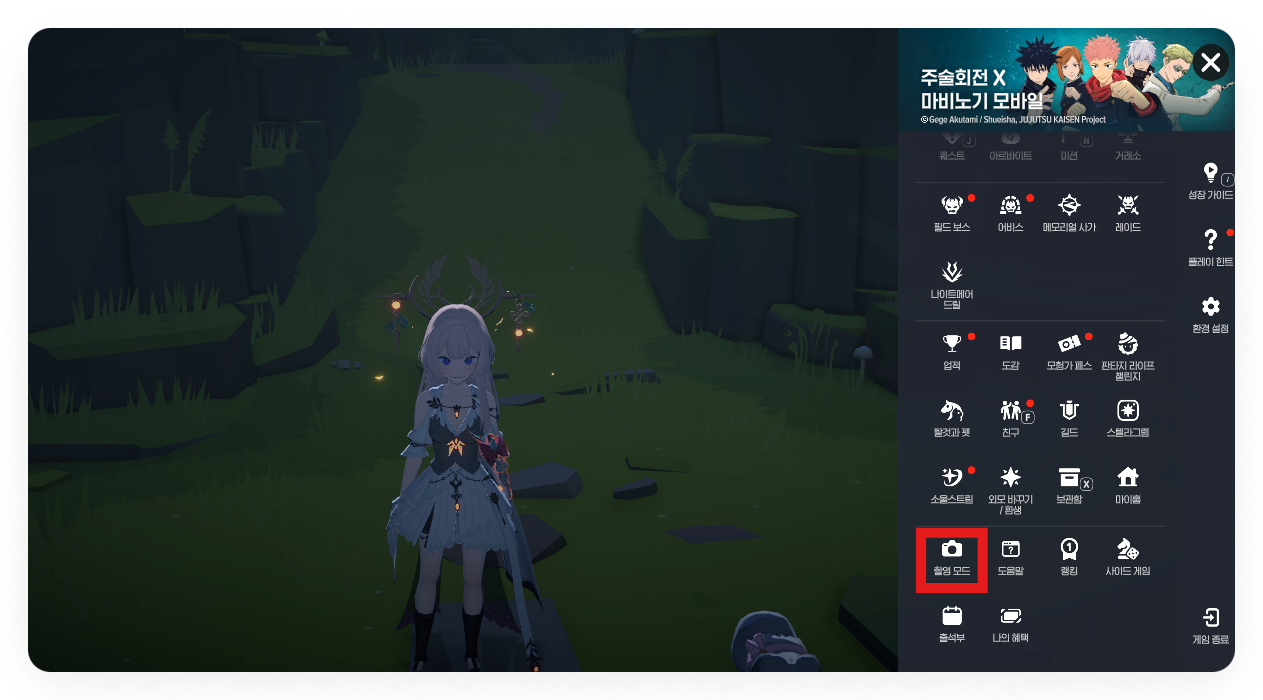
Go to Menu (≡) in the top right → Capture Mode → Photo Mode. |
|
|---|
|
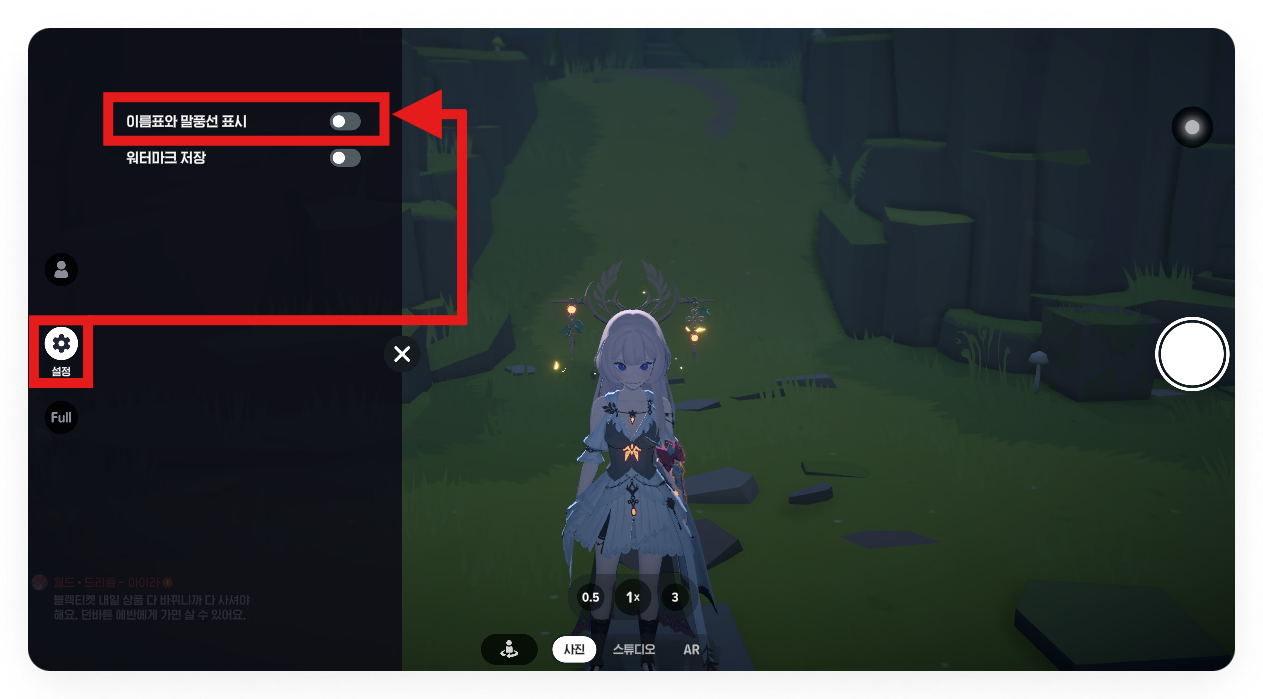
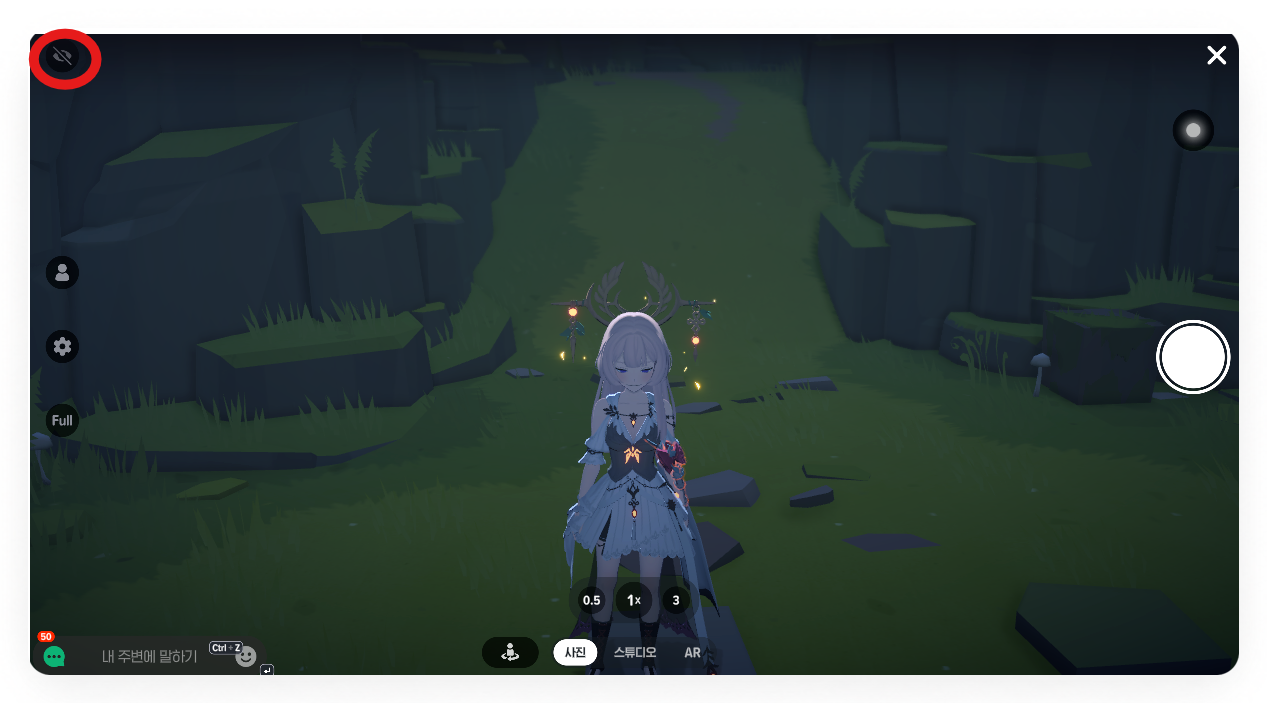
Turn off Options → Settings → Show Nameplates and Speech Bubbles. |
|
|---|
|
Once you've lined up your shot, tap the eye icon in the top left. |
If you take lots of outfit pics like me, have a look below the shutter button too!
If you want to capture the town scenery around your character, I'd recommend Photo Mode.
If you want to see the same outfit against a different background, Studio Mode is a great fit!
Wrapping Up
If I had to pick just one of today's settings for outfit lovers, it'd be Manual Camera!
You can switch it right from the top-right corner, and once you've changed outfits, it's fun to check out the sides and back
with a little look all the way around!
I was only going to check the back and get back to questing... Just one more screenshot...
Do you find Auto Camera more comfortable when you're wandering around town~?
Or do you prefer Manual Camera, where you rotate the view yourself?
That's all for this post!
I'll be back next time with more game talk!
달냥 signing off!