FC Online Football Kit Recommendations! Wear Your Favorite Club’s Kit Without Changing Your Squad, Plus October Events
껑이

This post was created as part of Nexon PEAK activities.
Includes probability-based items
Thumbnail
Hello, I'm 껑이, a gaming blogger.
If I had to recommend one football kit in FC Online, my choice would be Real Madrid's white home kit.
There are two reasons: I like its clean white design, and the color makes it easy to tell your players apart from opponents during matches.
But did you know that in FC Online, you can choose your favorite club's kit without building a squad of Real Madrid players?
You can give your team a fresh look with your preferred kit without buying expensive players or changing teams.
I also recommend taking advantage of the ongoing October login event while enjoying matches in your chosen kit.
Let's take a closer look.
FC Online Football Kit Recommendation: Real Madrid
Real Madrid's iconic white home kit has plenty of appeal.
The club's real-world Real Madrid home kit for the 2026/27 season, in particular, was unveiled with a white base and dark green and pink accents.
I like how it preserves the classic look while adding a refined touch.
I enjoy bold patterns too, but I think a kit that showcases a club's signature colors, like Real Madrid's, is one I could use for a long time without getting tired of it.
How to Change Kits in FC Online
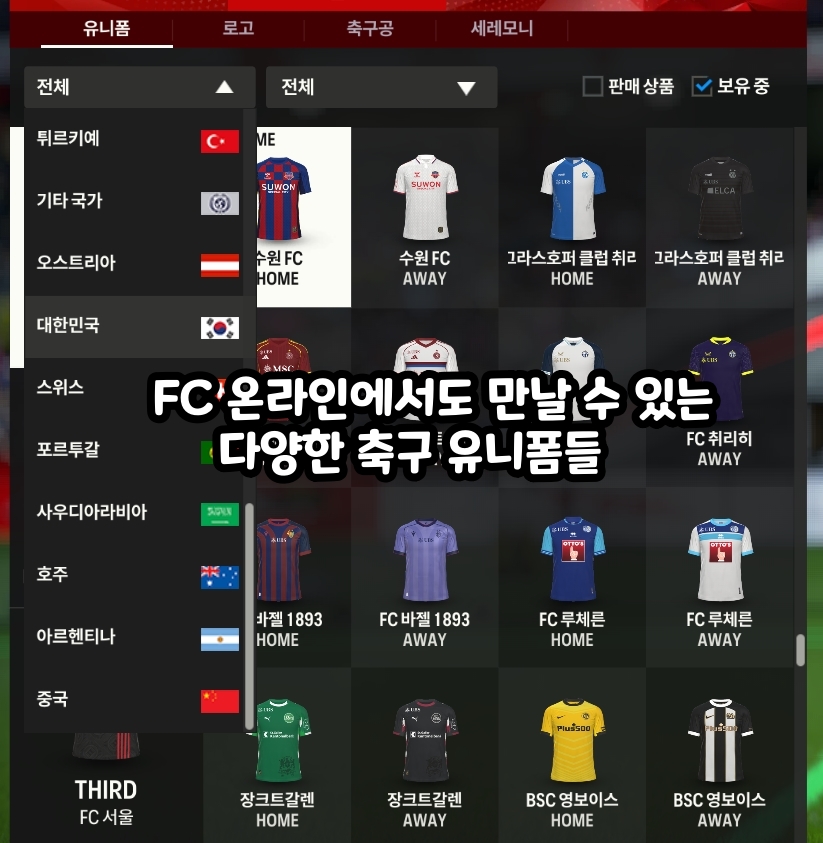
In FC Online, you can choose your preferred club's kit in the Locker Room without changing your squad.
Follow these steps to change your kit.
Step 1. Log in to the PC Version of FC Online
First, log in to FC Online and go to the main screen.
Step 2. Select the Locker Room Menu
Find and click Locker Room on the main screen. Here, you can manage player appearances and club customization options.
Step 3. Select Team → Kit
Once you're in the Locker Room, go to Team → Kit.
Here, you can browse the home and away kits of the various clubs available in the game.
Step 4. Find Your Favorite Club
Use the kit list filters to find your preferred league and club.
For example, if you want Real Madrid's kit, find and select Real Madrid in the Spanish league.
If you can only see kits you already own, check the Owned filter.
Step 5. Assign Home and Away Kits
Choose a design you like and assign it as HOME or AWAY.
Kit colors vary, so I recommend choosing home and away kits that contrast as much as possible.
Step 6. Check the Preview and Save
Use the player preview to see how the kit looks when worn, then click the Save button.
After saving, check that the kit has been applied in Kick-Off mode or Ranked Matches.
Some event-exclusive or limited-time kits may have specific unlock requirements or expiration dates.
Wear Your Favorite Team's Kit—Whatever Your Squad!
Your kit in FC Online does not have to match the clubs your squad's players belong to.
For example, even if your current squad consists of Bayern Munich or Chelsea players, you can wear a Real Madrid kit available in the Locker Room.
In other words, changing your kit gives your team a fresh look without changing your Team Color or buying expensive players again.
|
Team |
Kit Features |
|
Real Madrid |
Clean, bright colors |
|
Barcelona |
Iconic stripes |
|
Manchester United |
Bold colors |
|
Juventus |
Classic design |
|
Arsenal |
Sharp color contrast |
Of course, a design you like is not always the most practical choice for matches.
If your kit colors are similar to your opponent's, telling players apart can be difficult. Choosing a light home kit and a dark away kit is a good way to help avoid this.
If you change your squad often, you might also want to keep your kit consistent by sticking with the club you support.
Don't Miss FC Online's October Event!
You can also collect rewards from the ongoing FC Online login event while enjoying your matches.
The Autumn Yellow Ginkgo Login Event is currently underway.
Event Period: After maintenance on October 15, 2026 through October 28 at 11:59 PM
How to Participate: Log in to FC Online on PC or M
Weekday Rewards: 10 Autumn Yellow Ginkgos every 30 minutes
Weekend Rewards: 20 Autumn Yellow Ginkgos every 30 minutes
Daily Eligible Playtime: Up to 120 minutes
Reward Exchange Deadline: Before scheduled maintenance on October 29
Exchange the Autumn Yellow Ginkgos you collect for player packs, BP cards, fee discount coupons, and more by going to Shop → Event Lock Box → Autumn Yellow Ginkgo Shop in the game.
Changing your kit does not grant any additional event rewards.
Still, if you regularly take part in login events, this is a good opportunity to equip your favorite club's kit and enjoy some matches.
Frequently Asked Questions (FAQ)
Q. Can I wear another team's kit in FC Online?
A. Yes. You can wear any other club's kit available in the Locker Room, regardless of the clubs represented in your squad.
Q. Does changing my kit change my Team Color?
A. No. Kits only change your team's appearance and are separate from the Team Color effects determined by your squad composition.
Q. Do I need FC or BP to change kits?
A. You do not need a separate team change ticket to select a standard kit available in the Locker Room. However, you must acquire some special kits separately before you can use them.
Q. Why should I set different home and away kits?
A. Wearing colors similar to your opponent's can make it difficult to tell players apart during a match. I recommend choosing a light kit for one and a dark kit for the other.
That covers my FC Online football kit recommendation, how to change kits, and the October event.
The main appeal is that you can choose your favorite club's kit and give your team a look of its own without buying expensive players or changing teams.
Personally, I recommend a design like Real Madrid's white kit: simple, but with a clear sense of the club's identity.
#축구유니폼추천
#축구유니폼
#축구게임유니폼
#축구팀유니폼
Copyright 2026. 껑이 All rights reserved.