How to Build an FC Online Squad: I Built a Liverpool Team Myself Using the Official Guide
꽤돼
[This post was created as part of Nexon PEAK activities.]
Hello, this is Kkwaedae.
This time, I rebuilt my squad in FC Online using the official guide, and what stood out most was that even if you do not know football that well, you can quickly refer to team colors and top users’ squads, and it is easy to build within your budget while checking new traits and current market prices at the same time.
In the past, I often felt stuck trying to build a team just by looking at player names, but this time, the official guide made it much easier to finish a team I could use for league matches or 1v1 games with friends.
This time, I was deciding between Liverpool and Juventus.
To get straight to the point, I went with Liverpool because the new trait combinations and overall value looked better.
|
Feature Checked |
How I used it this time |
What I liked about it |
|
Trend Center |
Checked team colors and player tiers for Official Match 1vs1 |
Makes it easy to see at a glance which teams are used most often |
|
Top User Squads |
Used top Liverpool squads and formations as reference |
Gave me a clear starting point when building my own team |
|
Bulk Register Favorite Players |
Registered all 11 players I needed as favorite players at once |
Saved time searching for players |
|
Transfer Market Purchase |
Bought the registered players right away |
Made it easy to complete the team quickly based on current prices |
This is how I got started when building a squad with the official guide
This time, I started by looking for a team in the Trend Center based on Official Match 1vs1.
In the past, when I tried to put a team together, I did not know football very well, so I often got stuck right from the start on things like which players to use and which team color was good.
This time, I approached it by checking team color and player tier searches together in the Trend Center and then choosing the team that stood out to me.
What I liked about this process was that it was not just about looking at popular teams.
It also let me check the formations and player setups that people actually use within my budget range.
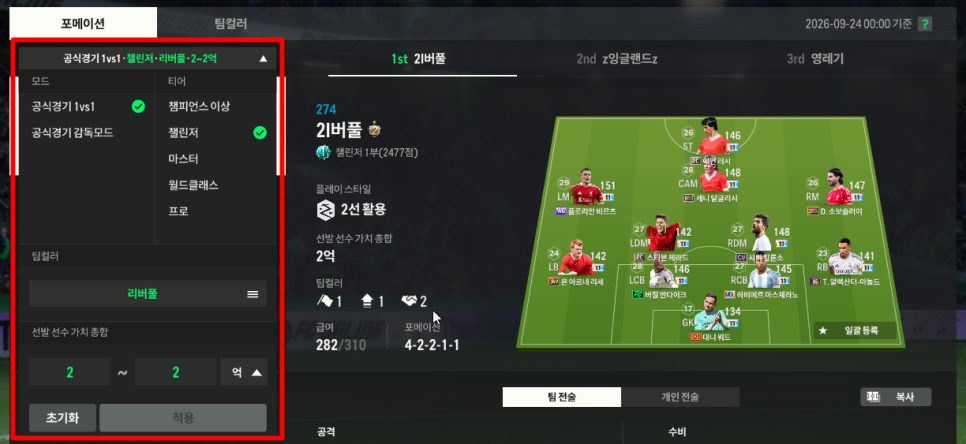
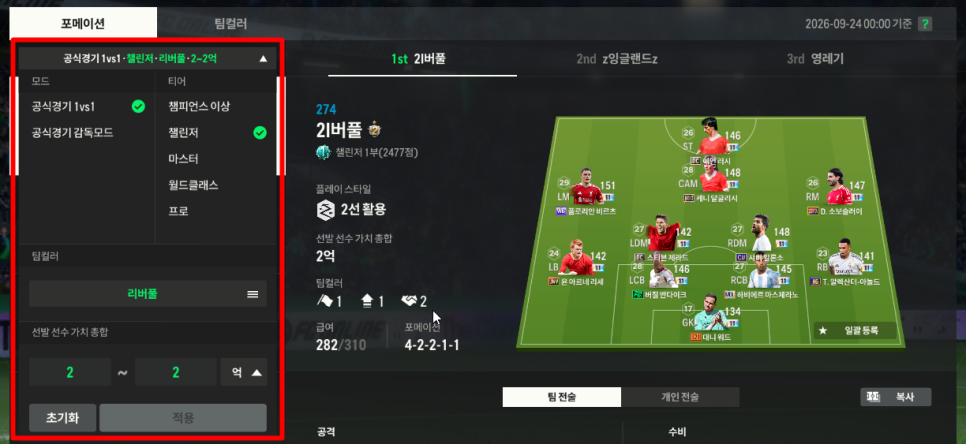
This time, the range I checked was Official Match 1vs1 / Challenger / Liverpool / around 200 million BP.
From there, I could immediately see which formations Liverpool users were running most often and what kinds of player combinations top-ranked users were using. Once I saw it for myself, my vague thought of “Should I try building Liverpool?” became much more concrete.
I was especially deciding between Juventus and Liverpool, but this time, Liverpool looked more appealing once I factored in the new traits.
With so many new traits being added lately, I felt it has become pretty important not to build a team based on name value alone, but to check what traits the players actually have as well.
Why Liverpool instead of Juventus?
The biggest reason I picked Liverpool this time was that it was easier to get the new traits while still keeping good value for money.
The Liverpool squads I saw in the Trend Center had solid team color synergy, and the player setup looked cleaner than I expected.
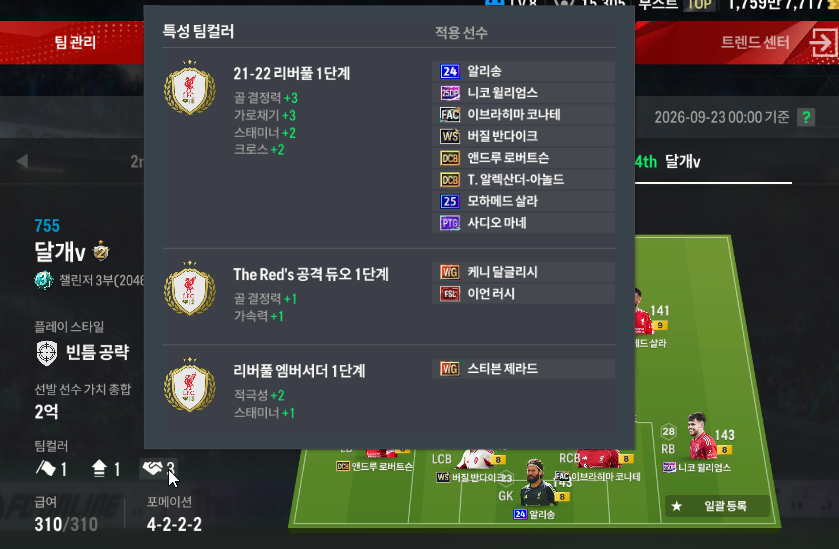
In the setup I checked, there were traits that supported the attack and key players, such as 21-22 Liverpool Team Color, The Red’s attacking duo, and Liverpool Ambassador.
What I liked most here was that, instead of just feeling like I was collecting famous players, I could actually see, at least to some extent, why each player was being used.
In particular, I wanted to build this team as an Official Match squad for league matches and casual games with friends.
From that perspective, Liverpool looked well balanced overall in terms of pace, attacking build-up, in-game feel, and the new traits as well.
I was also pretty satisfied with the value for money.
Maybe it was because of the Chuseok event, but player prices felt less burdensome than before, so it seemed like a good time to put the team together.
The bulk favorite player registration feature was more convenient than I expected
After deciding on the team, I looked at a squad I liked in the Trend Center and used bulk registration to add the players I needed to favorite players.
What made this feature especially useful was how much it reduced the hassle of searching for players one by one like before.
This time, after finding a Liverpool squad I liked, I added the players I needed to favorite players all at once and then moved straight to the transfer market.
After trying it myself, the flow of planning the squad → registering favorite players → purchasing felt very natural.
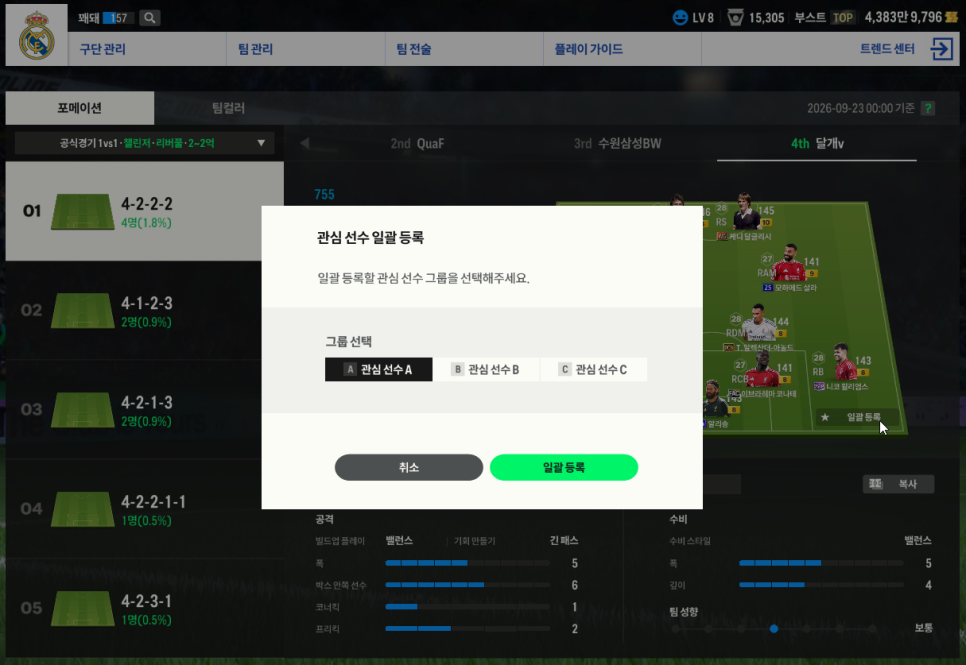
If you watch a lot of football, you can probably come up with player combinations faster based on your own preferences. But for someone like me, who used to feel lost when building a team, this kind of feature was genuinely helpful.
It felt much easier because I could approach it with the mindset of “find a team built around players I like, then build it.”
I signed all 11 players, and filled one spot with a lower upgrade level
After finishing favorite player registration, I bought the players right away from the transfer market.
In the end, I signed all 11 players, and the total cost came to about 200 million BP based on what was shown on screen.
That said, for one position, the upgrade level I originally wanted was too hard to find, so I went with a version one step lower instead.
That actually felt like a realistic part of the process too.
The official guide definitely helps set the direction for your team, but when you actually build a squad, you still have to consider the current listings and market prices together.
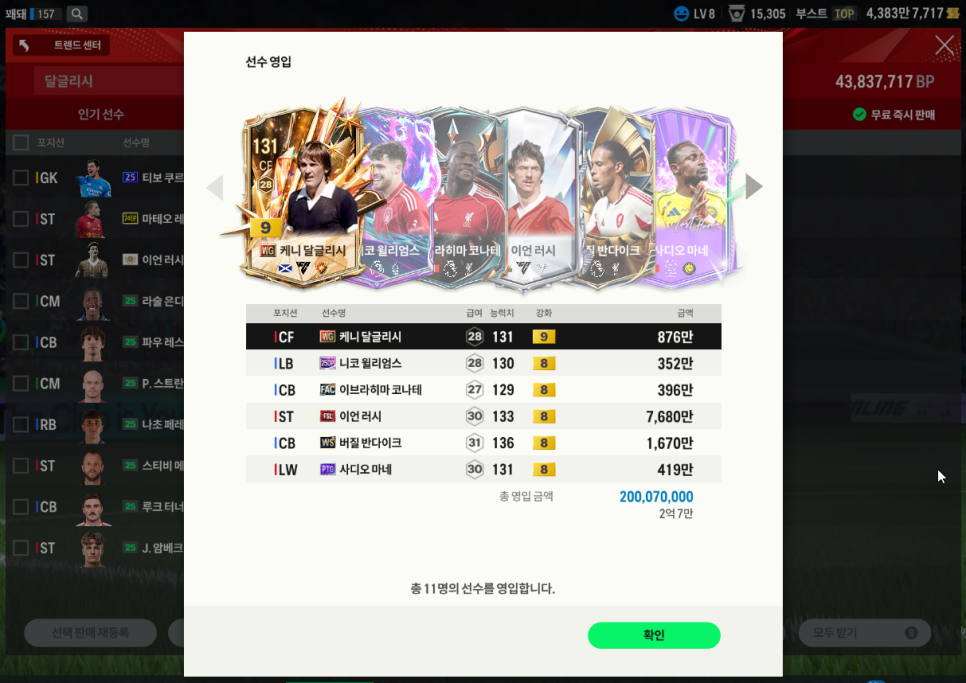
In FC Online, using the official guide to build a squad is not just about “looking at recommended players.” It is more like this:
-
check team colors and tiers in the Trend Center,
-
use a top user squad you like as reference,
-
gather the players you need through bulk favorite player registration,
-
then adjust it into your actual team while checking current prices and listings
That is the easiest way to understand the process.
This is the final squad I put together
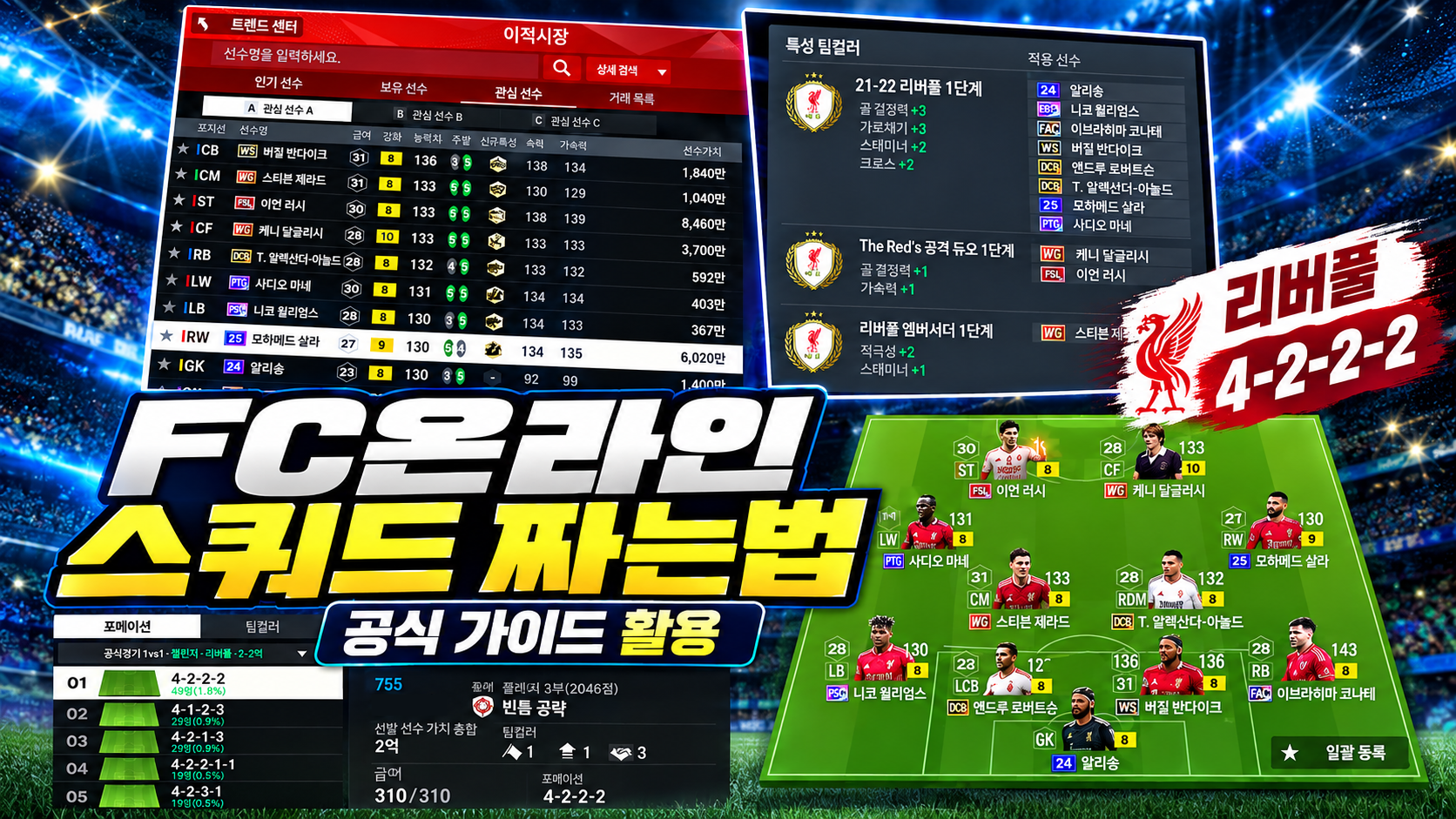
In the end, I completed a Liverpool squad in a 4-2-2-2 formation.
The main lineup was
Ian Rush, Kenny Dalglish, Mohamed Salah, Sadio Mané, Steven Gerrard, Trent Alexander-Arnold, Andrew Robertson, Virgil van Dijk, Ibrahima Konaté, Neco Williams, Alisson.
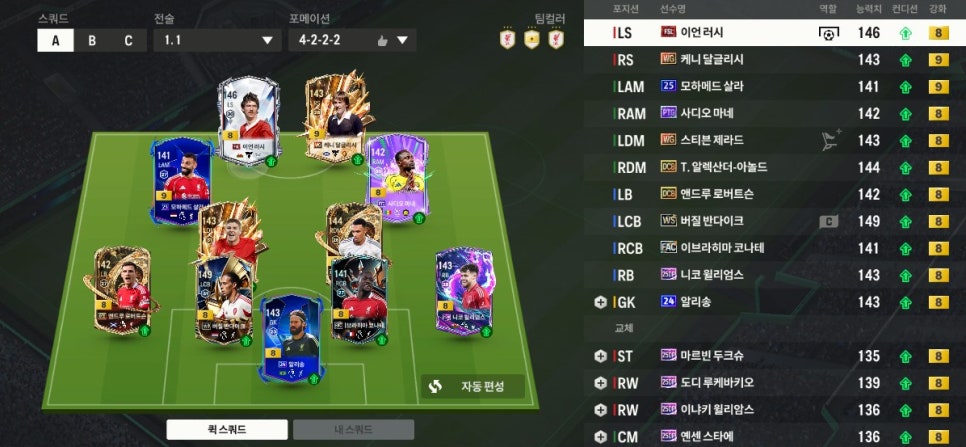
After building it myself, I could see why Liverpool shows up so often.
The attack has good pace, and the midfield and defense felt quite stable in-game rather than just looking strong on name value.
Most of all, with the new traits included as well, I was pretty satisfied using it as a team for Official Matches or casual games with friends.
For now, I think I will keep using this team until the next upgrade.
If you are building your first team, this approach is worth trying
If you are putting together a squad in FC Online for the first time, I would recommend starting the way I did: pick a player you like or a team color you are interested in first, then go into the official guide from there.
I also did not know football very well before, so building a team itself felt like a big barrier. Now, though, it has become much easier thanks to the Trend Center and the favorite player registration feature.
Especially at a time like this, when prices have come down a bit, there is also a lot of fun in building a team yourself with players you like.
That is all from Kkwaedae.



![[피크 챌린지] FSL! 프로게이머들의 화려한 무대! 함께 시청해요!](https://peak-file.nexon.com/uploads/20260714_0244_24c3a645.png)
![[피크 챌린지] 친구와 함께하기 좋은 게임 FC온라인, 같이 하면 더 재미있는 이유](https://peak-file.nexon.com/uploads/20260618_0640_e4087af9.png)