MapleStory Daily Play: How to Enjoy an Online RPG with Less of a Daily Grind
껑이

Daily MapleStory Play: How to Enjoy an Online RPG with Less Daily Pressure
Includes randomized items
Hello, I’m 껑이, a gaming blogger.
To reduce the daily pressure of an online RPG, start by letting go of the idea that you need to complete every piece of content. This is especially helpful for casual players.
MapleStory has a reputation for being a very demanding game.
But if you organize your daily tasks with the Maple Scheduler and prioritize short, efficient activities like Symbol daily quests and Monster Park, you can enjoy it with much less effort than you might expect.
As you play MapleStory, the list of things to keep up with continues to grow, from Symbols and Monster Park to bosses and events.
At first, working through them one by one can be fun. But as thoughts like “I need to do this today, too” start to add up, it can feel more like homework than a game.
That is why, for daily MapleStory play, I recommend first deciding how long you want to play, then using the Maple Scheduler to select only the content you need that day.
Let’s take a closer look.
Check the Maple Scheduler First
Checking the Maple Scheduler as soon as you log in means less time spent figuring out what to do that day, so you can start playing right away.
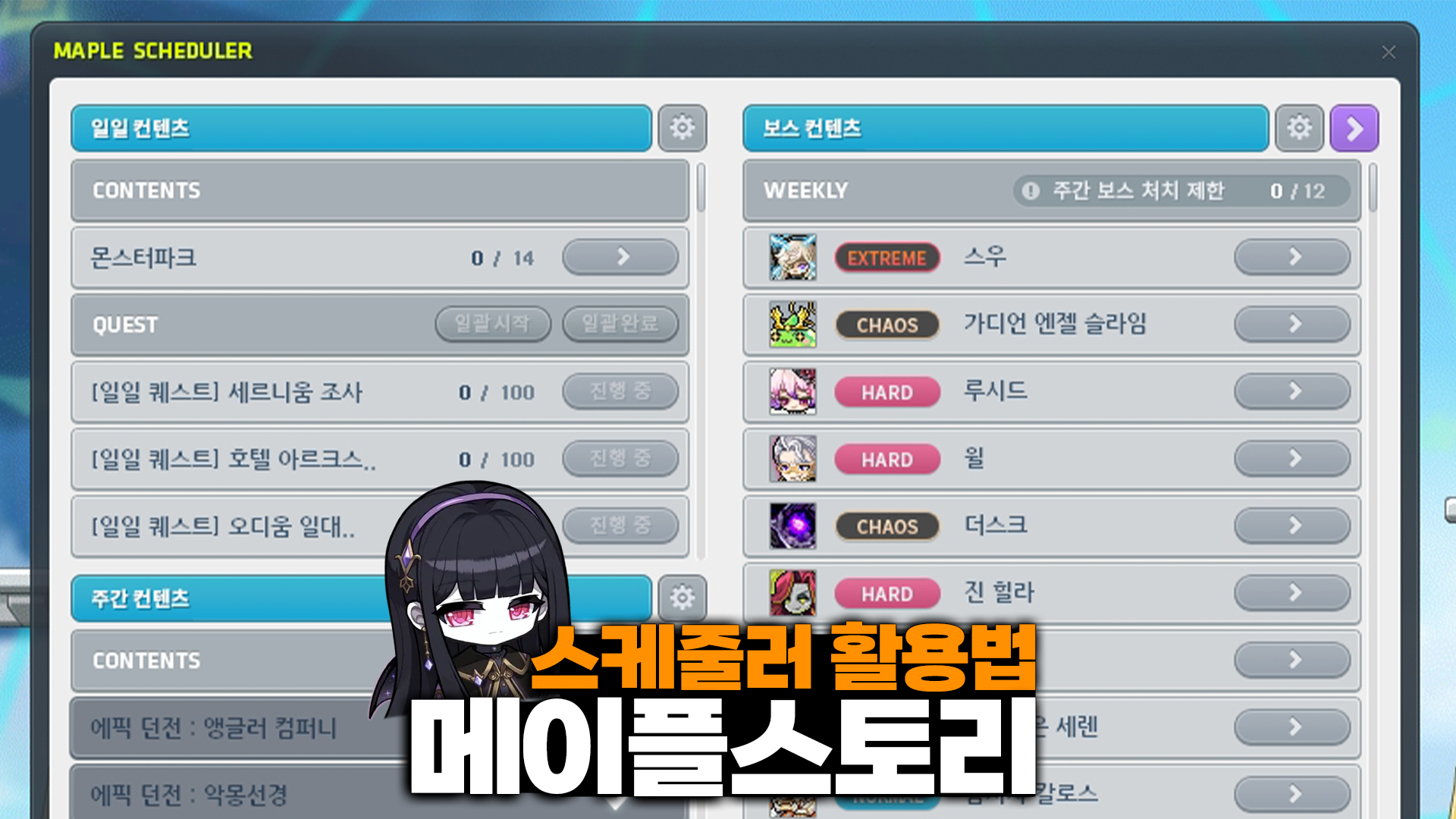
The Maple Scheduler is a feature that lets you check and manage your progress on daily, weekly, and boss content in one place.
Adding content you play often saves you from having to remember which daily quests and bosses you have completed. You can also start some content or travel to it directly through the scheduler.
You can open the scheduler with F2 or through the menu to edit your content list.
Adding content is straightforward, even if you are using it for the first time.
How to Add Content to the Maple Scheduler
Open the scheduler
Find the Edit Content List feature in the scheduler
Select the daily, weekly, and boss content you want to track
Use the scheduler to check your progress on that content
Rather than adding everything at once, I recommend starting with content you play regularly, such as the following.
Symbol daily quests
Monster Park
Weekly bosses
Weekly content you play often
Adding daily quests to the scheduler also lets you use the Start All and Complete All features, saving you the trouble of visiting multiple regions to handle each quest individually.
Fit Your Daily MapleStory Routine to Your Available Time
I have found that trying to finish every daily task becomes a burden, wears me out, and eventually makes me stop playing.
The daily online RPG routine I recommend is simple:
|
Daily MapleStory Playtime |
Recommended Routine |
|
About 10 minutes |
Symbol daily quests → Monster Park |
|
About 20~30 minutes |
Symbol daily quests → Monster Park → Daily Gift or an easy boss |
|
30 minutes or more |
Symbol daily quests → Monster Park → 30 minutes of hunting with a Wealth Acquisition Potion |
|
Weekends |
Complete weekly bosses, Epic Dungeons, and other content in one session |
If you have very little time, it is fine to finish just Symbol daily quests and Monster Park and log off.
Fitting in both bosses and hunting on weekdays is not easy for casual players with full-time jobs.
If your daily playtime is limited, reducing the time spent moving between activities matters much more than the number of tasks you complete.
Rather than simply feeling that you finished your chores quickly, you are more likely to think, “I only planned to play for 10 minutes today, but maybe I’ll hunt a little longer?”
Personally, I think this is an important distinction.
It is easier to keep returning to a game that gives you a sense of progress even in a short session and lets you play longer when you feel like it. That is much more sustainable than hesitating to log in because there is so much to do.
Focus on Enjoying the Game Long-Term Without Pressure
MapleStory is better approached as a game to enjoy over the long term, choosing what you need at your own pace, rather than one where you have to finish every piece of content each day.
You do not need to worry about content like weekly bosses or Epic Dungeons every weekday.
Just check the scheduler to see what is unfinished, then complete it in one session on a day when you have more time, such as a weekend. There is no need to rush.
If you have no plans for the weekend, leveling an alternate character is another good option.
Working on an alt after finishing your main character’s routine is a manageable approach. If you try to complete every daily quest on multiple characters from the start, your daily MMORPG routine can quickly become tiring.
Frequently Asked Questions (FAQ)
Q. What should I do first if I only have 10 minutes?
A. I recommend checking the Maple Scheduler, then prioritizing Symbol daily quests and Monster Park.
Q. Should I add every piece of content to the scheduler?
A. No. It is easier to manage if you add only the content you play regularly. Adding too much can make the scheduler itself feel like another chore.
Q. Do I need to check weekly content every day, too?
A. You can simply check your progress and save the content for a single session on a day when you have more time.
Q. Should I keep up with all my alts’ daily quests, too?
A. If you are short on time, I recommend focusing on your main character. Adding an alt when you have time to spare keeps the routine more manageable.
In an online RPG like MapleStory, where progression takes place over the long term, building a routine that lets you keep logging in without pressure matters more than how much content you finish in a day.
For a manageable daily MapleStory routine, I find that the best way to minimize the daily burden is to use the scheduler and choose only the content that fits the time I have that day.
Copyright 2026. 껑이 All rights reserved.



![[메이플스토리] 스케줄러로 일일 숙제 관리하기, 플레이 부담 줄이는 방법](https://peak-file.nexon.com/uploads/20260904_1213_a320164d.png)