How to Make Dailies More Manageable with the MapleStory Scheduler
피스타임

Hello!
I'm Nexon Picker 피스타임.
To make daily chores less demanding in an online RPG, the key is to focus on the tasks you need rather than trying to do everything. This cuts down on unnecessary playtime and makes it easier to track what you have completed, even when you are leveling multiple characters.

I took a short break from my Picker activities after Nexon Picker Season 1 ended. Now that Season 2 has begun, I'm back after some time away.
I kept playing Nexon games during my break. In MapleStory in particular, I leveled the new class 레테 on the Challengers server and even placed 28679th in the Challenger rankings!

Over my time playing MapleStory, though, I've ended up with another alt or two each time I play on the Challengers server. The extra weekly boss income lets me invest more in my main, which is a definite plus. But it also means more content to keep up with, making my daily routine considerably more demanding.
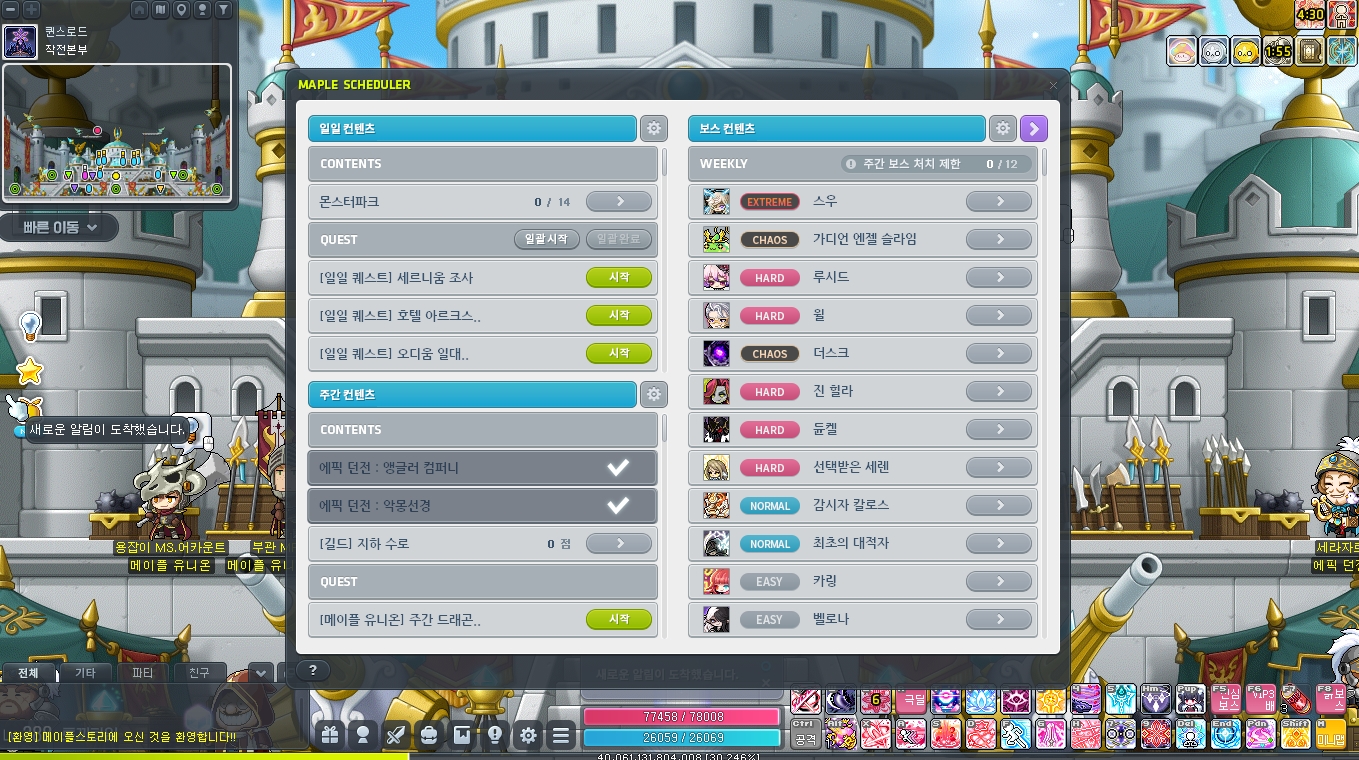
Fortunately, MapleStory has a system called the Scheduler! Introduced in June 2024, it lets you organize daily, weekly, and boss content separately for each character. Let me show you how to use it to streamline your chores.
How to Use the Scheduler
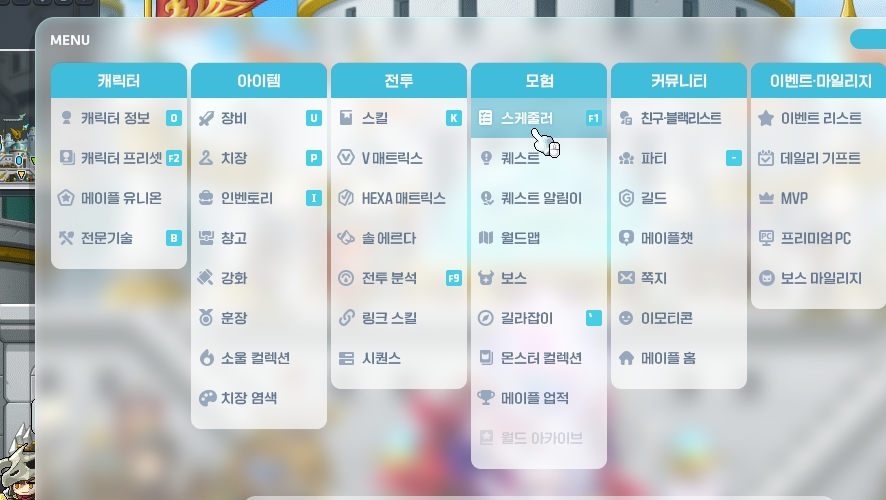
You can find the Scheduler at the very top of the Adventure section in the menu.
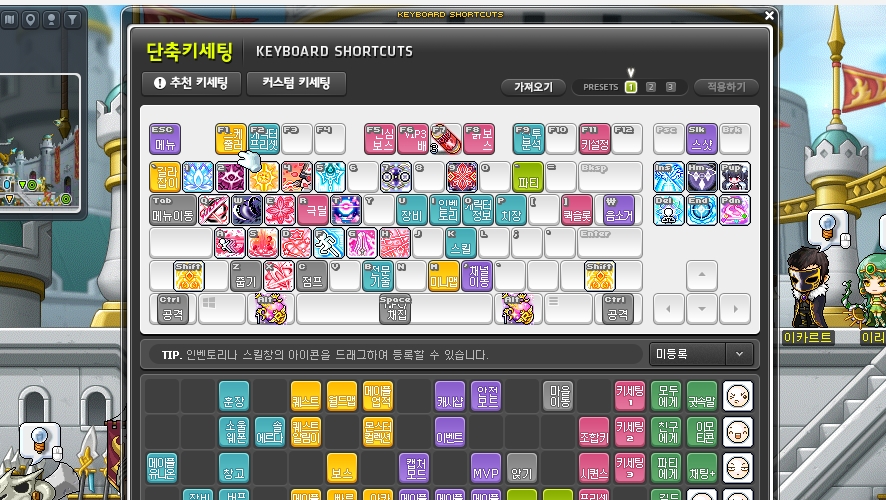
For easier access, I recommend assigning the Scheduler to a key of your choice in the key binding settings. I have mine set to F1.
Setting Up the Scheduler for Your Main
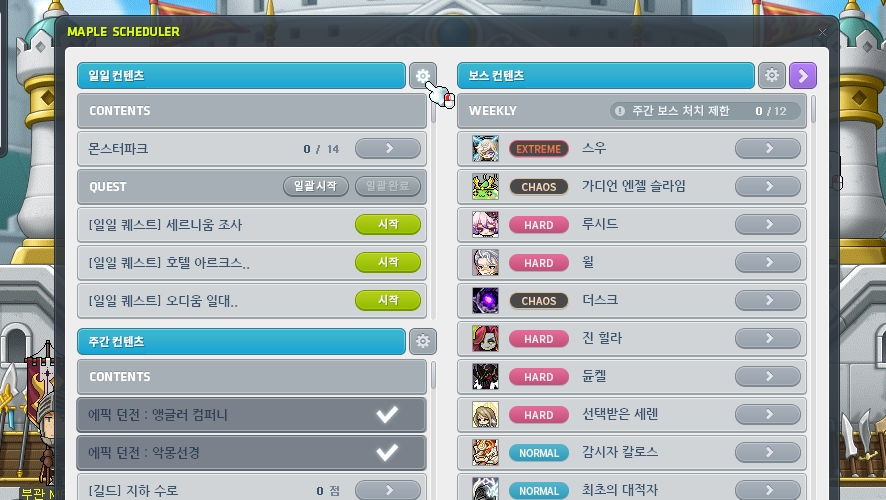
Let's start with the most important part: setting up the Scheduler for your MapleStory main. Click the gear next to Daily Content.
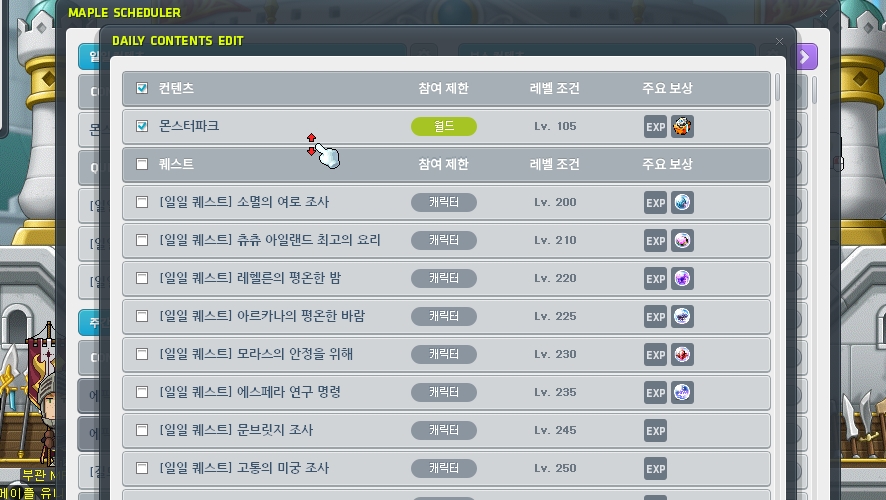
Check Monster Park. Did you know that Monster Park gives you 2 free entries per server? That means 2 free runs on the Challengers server and 2 on your regular server—a nice bonus.

Next, under daily quests, check all the quests for symbols you have not maxed out yet. I've already maxed out my Arcane Symbols, so I unchecked those and left only the Sacred Symbols checked.
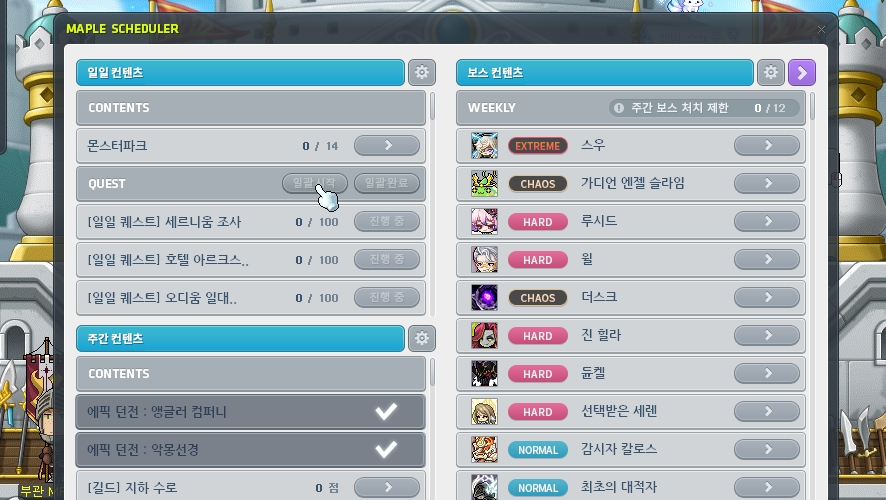
Start All lets you accept every quest with a single click. Once you finish them, click Complete All to turn them all in at once. For Monster Park, clicking the arrow automatically takes you to the Monster Park map. Pretty convenient, right?
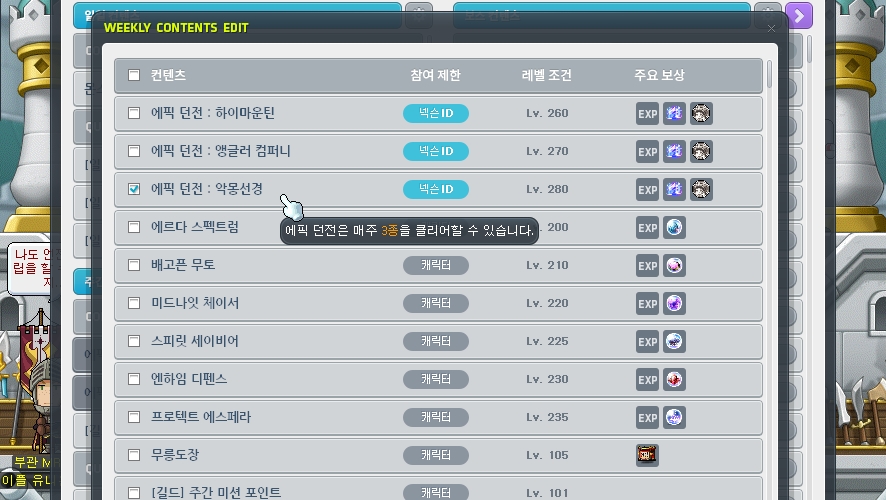
Weekly content is a little more complicated. There are 3 Epic Dungeons, available at levels 260, 270, and 280. Each can only be run once per server. Since this is your main, check only the highest-level Epic Dungeon. Currently, that is 악몽선경 at level 280.
If you have finished upgrading your symbols, there is no need to check the Arcane Symbol quests listed below, such as Erda Spectrum.
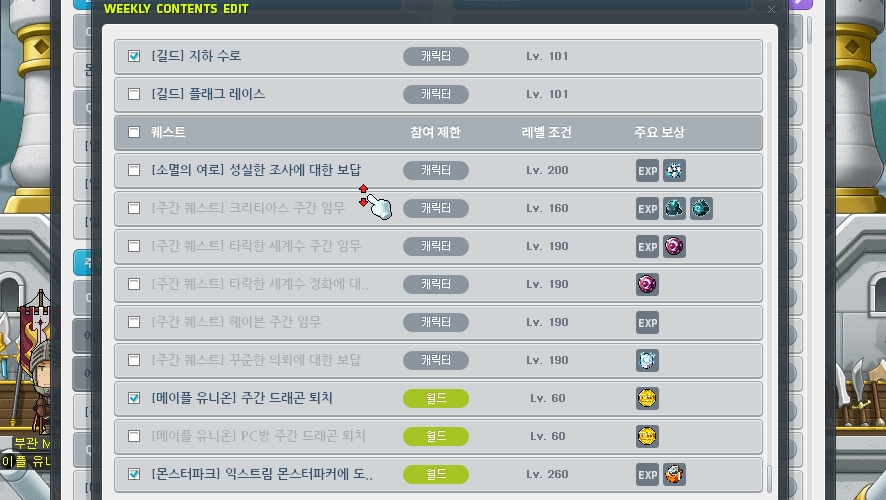
Then scroll down and check Sharenian Culvert. Most guilds encourage members to run it. Flag Race may also be required, but it is optional in my guild, so I left it unchecked.
A Reward for Diligent Research gives you 3 untradeable Nodestones for completing the Vanishing Journey dailies 2 times. It's not a bad reward, but I don't want to do those dailies just for 240,000 mesos, so I leave it unchecked.
Check Weekly Dragon Hunt and Are You Up for the Extreme Monster Parker Challenge? These weekly activities reward Legion Coins and EXP, respectively.

You only need to do weekly content once a week. Click the Epic Dungeon and run it, then complete Sharenian Culvert, and you're done. Do the dragon hunt if you want Legion Coins. The Extreme Monster Park mission completes automatically if you run Monster Park 2 times every day, so you just need to claim the reward.
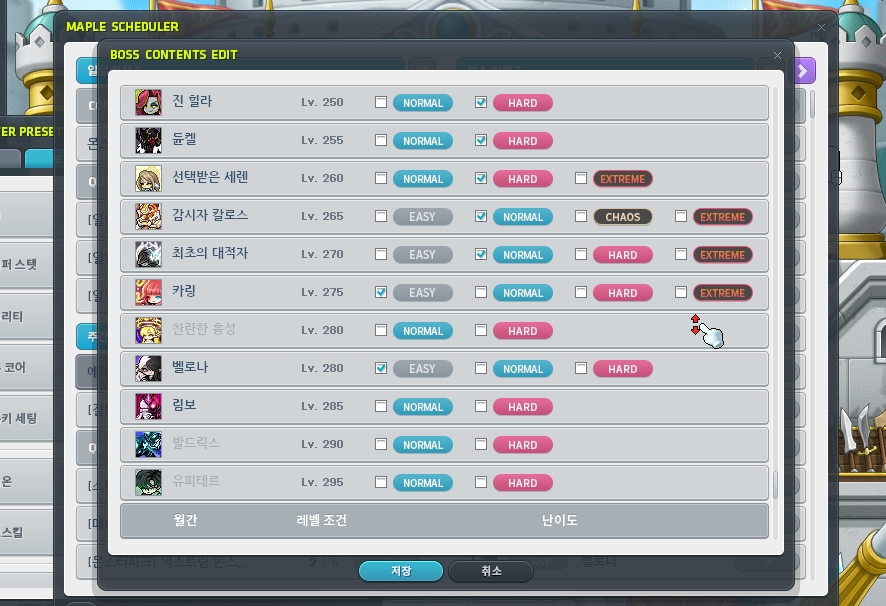
Finally, there's boss content. Skip daily bosses, since their rewards are not particularly worthwhile, and check the weekly bosses that match your character's strength.
I can solo up to Extreme Lotus, so I checked 12 bosses at that difficulty or lower. MapleStory currently lets each character sell a maximum of 12 weekly boss crystals.
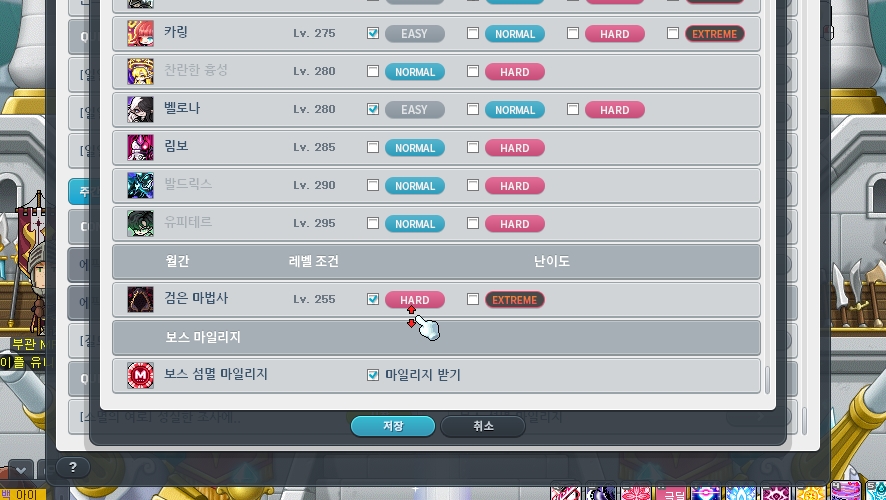
Don't forget the monthly boss, the Black Mage! Checking the option to claim boss defeat Reward Points also makes those points easy to collect.
Setting Up the Scheduler for an Alt on Another Server
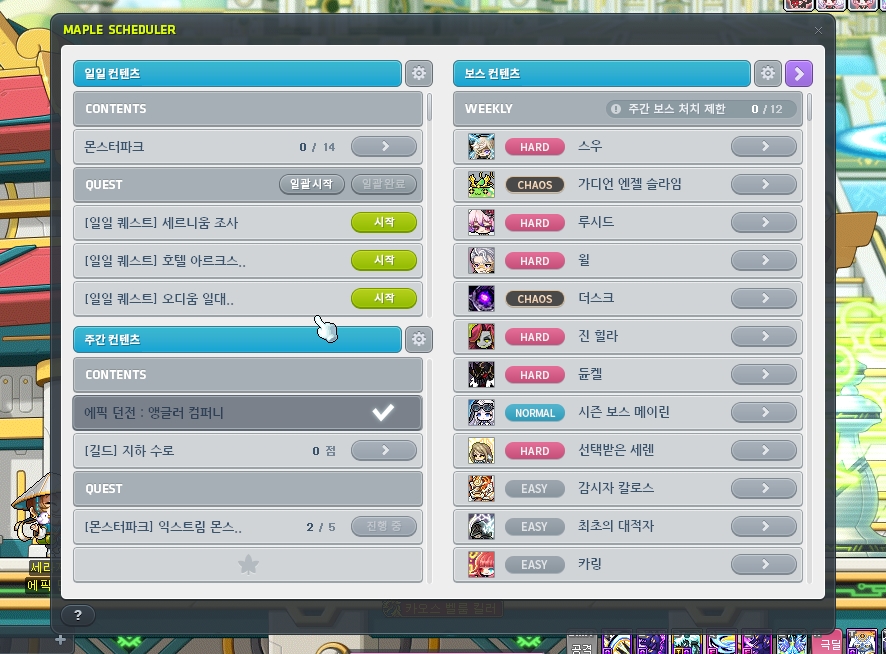
Here is the Scheduler setup for my alt on the Challengers server. Since it is a different server, I include Monster Park for the 2 free entries. For daily quests, I've checked only the Sacred Symbol regions.
For weekly content, I've checked just 3 items: Angler Company, Sharenian Culvert, and Extreme Monster Park. Nice and tidy.
I also selected bosses based on the character's Combat Power. The Challengers server has a Season Boss that does not count toward the 12 boss crystal limit, so checking 13 bosses makes them easier to track.
Setting Up the Scheduler for an Alt on the Same Server
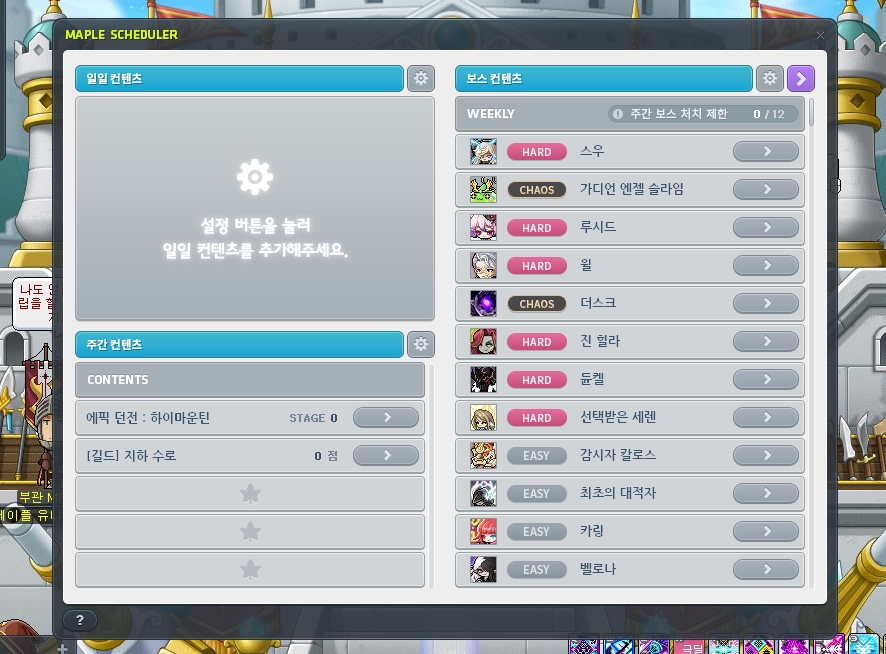
The setup for an alt on the same server is simple. Skip Monster Park because there are no free entries left on that server. I don't bother checking symbol quests either, since they are a hassle.
For weekly content, High Mountain is the one dungeon left, so include it. Check Sharenian Culvert as well, since you need access to Noblesse Guild Skills. Then select bosses that match the character's Combat Power.

That covers how to set up the MapleStory Scheduler for each character to make your daily chores more manageable.
Leveling multiple characters does not mean you have to do every piece of content on all of them. The key is to focus your main's schedule on the daily and weekly content needed for progression, while keeping only activities with worthwhile rewards, such as Epic Dungeons and weekly bosses, on your alts.
My roster of alts has kept growing through my time on the Challengers server, but setting up the Scheduler separately for each character has made it much easier to see what I've done and what is left. If keeping up with chores has made you hesitate to log in to MapleStory, give the Scheduler a try.
This is Nexon Picker 피스타임, signing off. Thanks for reading!


![[메일기] 롯데월드 메이플 아일랜드, 헤네시스 머쉬룸 파크 후기](https://peak-file.nexon.com/uploads/20260529_0435_af2ea7ed.jpg)