[PEAK Challenge] MapleStory’s official app made it possible to keep playing MapleStory even outside the game
드록바원툴
![[PEAK Challenge] MapleStory’s official app made it possible to keep playing MapleStory even outside the game](https://peak-file.nexon.com/uploads/20260728_0152_a6737944.jpg)
Participating in the Nexon PEAK Post Challenge
While playing MapleStory, I found myself wondering if there was another game with convenience features this well built out. Even without launching the game, I can check the Auction House on my phone, look up character information, and keep up with events.
Today, I want to talk about how the official MapleStory app changed my experience with the game.
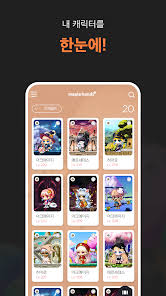
The official MapleStory app, Maple Hands+, is more than a simple information app. It feels like part of the game has been brought onto your smartphone. If you register a trusted device, extra functions are added, including Auction House access, purchases, and item collection. At first, I was genuinely surprised that I could check the Auction House and buy items from my phone without logging into the game at all.
You can also check Auction House prices on your phone while hunting, and if the item you want gets listed, buy it right away. Being able to handle trades without interrupting what I’m doing in-game is more convenient than I expected. Before, if I wanted to check the Auction House, I had to stop hunting and go back to town. Now I can keep hunting, check prices on my phone, and pick up the items I need immediately.
You can view detailed information on your character’s items, skills, and quests, and when you tap an item, you can also see enhancement option details and skill advancement level information. Being able to understand my character’s condition at a glance outside the game has been genuinely helpful for managing my specs.

The feature I used most in Maple Hands+ was remote access to the Auction House. During my commute or while I was out, I could check the Auction House on my phone, follow item prices, and buy a strong listing as soon as it appeared.
Maple Auction can be opened from the menu or through quick move anywhere recognized as a town, and the system also allows purchases from hunting maps. Once remote access through the app was added on top of that, it became possible to make use of the Auction House from almost anywhere. I used to leave the game running because I was worried about missing a good item, but now that has naturally changed into checking in through the app whenever I need to.
With the December 2024 patch, the Auction House introduced a world-integrated auction system, which made it possible to buy listings posted by users in other worlds for equipment and cash items. That broadened the range of items you can search for. Since you can check this integrated Auction House through the app as well, it became even more useful.

Aside from Maple Hands+, I also found good use in an official partner app called Maple Book. After registering a character, you can look up detailed information including equipment and cash items, skill growth, guild, ranking, Mu Lung Dojo, Union, and experience and combat power history.
It also offers Star Force and Hexa Stat simulator features. Using a Star Force enhancement tool with a UI similar to the in-game version, you can check enhancement probability information and how many mesos were spent. Being able to simulate enhancement outside the game helped when planning my spec growth. It lets you estimate in advance how many mesos you may need before committing to the real upgrade.
There is also a boss profit analysis feature, which lets you check boss income by character on a daily, weekly, and monthly basis. Since it shows through data which bosses are more efficient for meso farming, it was practically useful when putting together a bossing routine.

Another feature I found useful in Maple Hands+ was checking notices and events. You can review announcements, maintenance schedules, and events ahead of time. If you know through the app when a new event starts or when maintenance is coming up, it becomes much easier to plan your time in-game.
On days with major events, such as Sunday Maple notifications, the app’s push alerts let you know in advance, so I miss them less often. It creates a much more convenient setup where you can stay on top of important events without keeping the game open all the time.
The biggest change that came from using Maple Hands+ and Maple Book was the sense that I could still manage Maple without always having the game open. Checking the Auction House on my commute, looking through event notices at lunch, and analyzing boss profits all now happen naturally outside the game.
Without these convenience features, I would have had to spend much longer sitting in front of the game. Now, those same tasks can be handled just by taking out my phone for a moment. They are the kind of features that start to feel essential once you have used them, to the point that I found myself wishing more games would adopt the kind of convenience MapleStory offers.
Are you using Maple Hands+ too? Let me know in the comments.
![[피크 챌린지] 마비노기 모바일 게임 속 이쁜 굿즈들](https://peak-file.nexon.com/uploads/20260628_0503_302ae96d.jpg)
![[피크 챌린지] 얘 빌런 맞죠...? 죄송하지만 인정못하겠습니다](https://peak-file.nexon.com/uploads/20260619_0419_45d2fdc4.png)
![[피크 챌린지] 엘소드에 대해 모르겠으면 '가이드'를 가자](https://peak-file.nexon.com/uploads/20260715_0656_9d294c72.png)
![[피크 챌린지] 메이플스토리, 무과금이나 소과금으로도 알차게 성장의 재미를 느끼는 넥슨의 대표 과금 부담 적은 게임](https://peak-file.nexon.com/uploads/20260811_1121_777d9271.jpg)