[PEAK Challenge] How FC Online Let Me Manage My Team Without Turning On My PC
폭풍같은주황호랑이31281
![[PEAK Challenge] How FC Online Let Me Manage My Team Without Turning On My PC](https://peak-file.nexon.com/uploads/20260728_0129_f5faa66f.png)
[Participating in the NEXON PEAK Post Challenge]
https://peak.nexon.com/post/2310
In football games, buying and selling players can sometimes take up more time than playing matches.
When I first started playing FC ONLINE, I managed my team entirely at my computer. After each match, I would open the transfer market, check player prices, relist anyone who had not sold, and then start the next match.
The trouble began when player prices started to occupy more of my attention.
I would wonder whether a player I had listed before work had sold. If I heard that the price of someone I had been watching for days had dropped, I wanted to check even when I was out. But turning on my computer every time was not an option.
What made this easier was the transfer market features in FC ONLINE M and on the official website.
If I had to choose one NEXON game with a good range of convenience features, it would be FC ONLINE. Being able to give matches my full attention on the computer while handling smaller team management tasks on my phone or the web was especially useful.
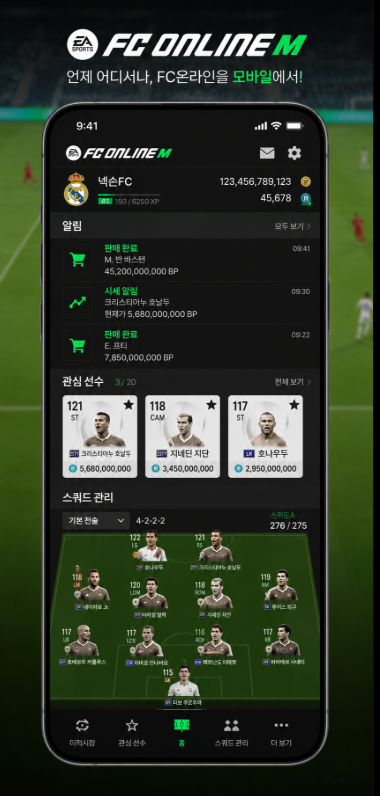
A lunchtime notification told me my player had sold
At first, I used FC ONLINE M only to collect login rewards.
I would log in briefly, check the rewards, and close the app. Then I discovered that I could also access the transfer market on mobile, which completely changed how I used it.
One day, before leaving for work, I listed a player I was not using for sale. I needed to sell him before I could afford a new defender, so I set the price a little lower.
When I checked my phone at lunch, the player had sold.
Previously, I would have waited until I got home from work and turned on my computer. This time, I checked the prices of potential replacements there and then. Rather than buying immediately, I compared a few players and placed a purchase order at a reasonable price.
By the time I got home that evening, the new player had already arrived.
Once I turned on my computer, I could put him straight into my squad and start a match without opening the transfer market first.
It did not give me more time to play matches, but it made a noticeable difference by cutting down the time I spent on tasks outside matches.
The official FC ONLINE website also offers transfer market and main squad features, and mobile transfer market management continues to improve. (EA SPORTS FC ONLINE)
Price alerts helped, but too many became tiring
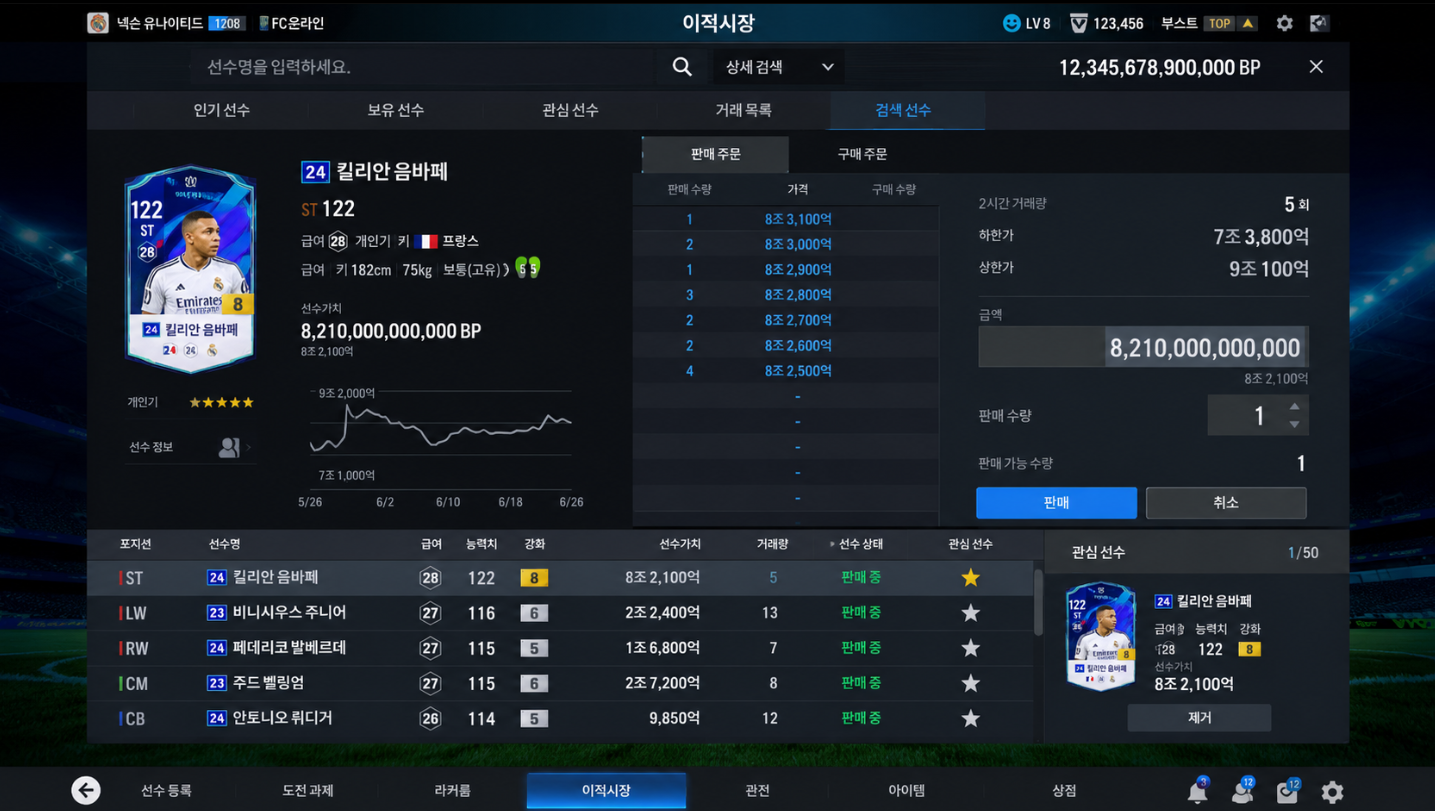
The features I used most often were the player watchlist and price alerts.
Even when there is a player I want to buy, I cannot spend all day watching the price. Setting a target price and waiting for an alert saved me from constantly refreshing the transfer market.
According to the official guide, the price alert service lets you set your preferred buying and selling prices and receive notifications through the mobile app. To receive them, you need to enable notifications in both your phone and app settings. (EA SPORTS FC ONLINE)
At first, I added too many players to my watchlist.
Even small price movements brought a steady stream of notifications, with player price alerts mixed in among important messages. A feature I had enabled for convenience ended up making me check my phone more often.
After that, I kept only the players I was genuinely likely to buy.
That usually meant one replacement for a current starter, one player I wanted to buy if the price dropped, and one player I was waiting for the right time to sell.
I also stopped setting alerts at the lowest price without much thought. Instead, I looked at the recent trading range and chose a realistic figure—an amount I would be willing to pay right away.
I did not rush to buy just because an alert arrived. I checked the trading volume and current listings once more, since a brief dip in price sometimes turned out to be followed by a further drop.
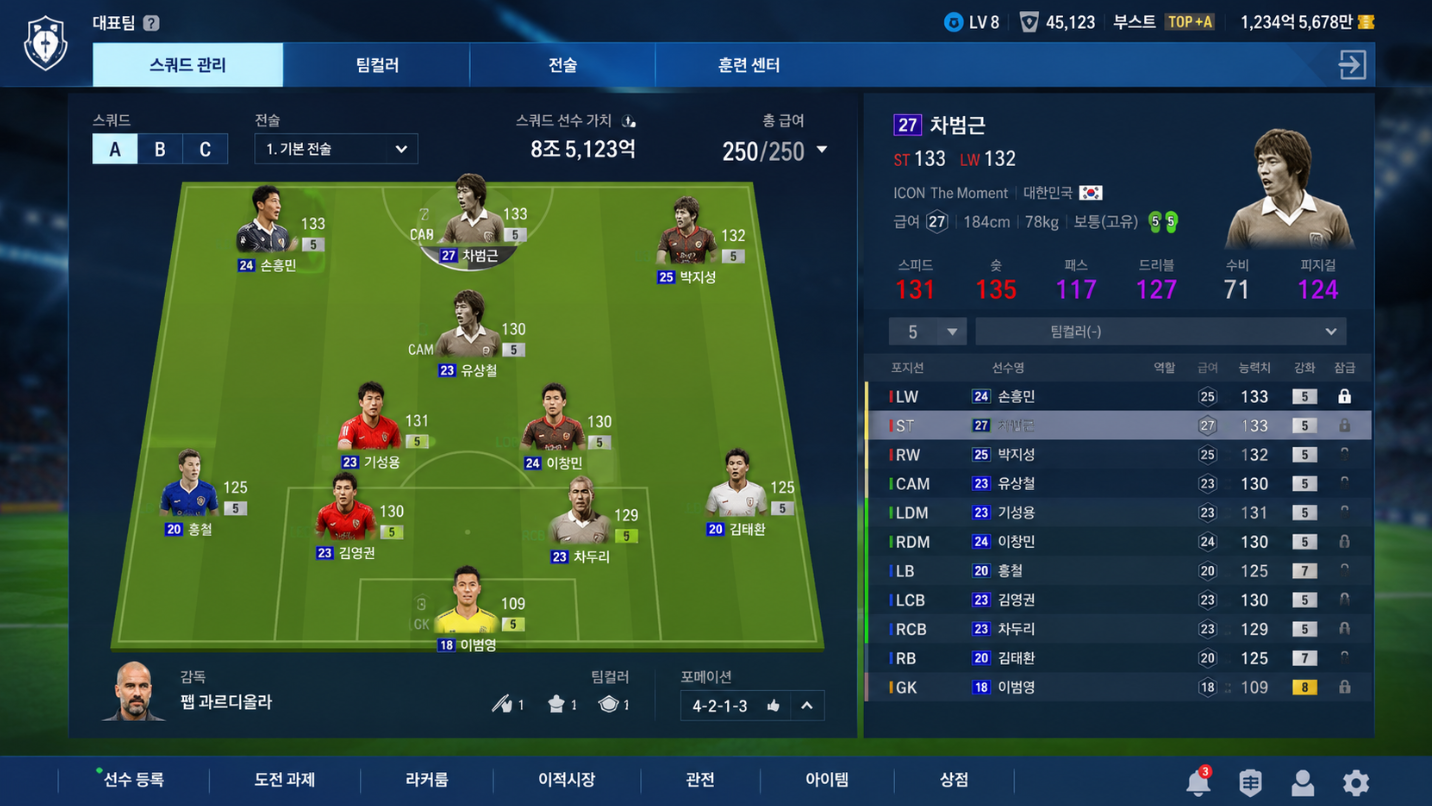
I did more squad planning on the move than during matches
After playing FC ONLINE for a while, I found myself thinking about my team even when I was not playing a match.
On the bus, I might suddenly want to try a different formation, or find myself wondering which position to downgrade to stay within the salary budget.
I used to work these things out in my head, only to forget them by the time I got home.
With access to my main squad and player information on the official website, I could sketch out a lineup while on the move. I checked how replacing a striker would affect the total salary and picked players for the remaining positions in advance. Alongside profiles and the transfer market, the official site also provides a Data Center and squad information. (EA SPORTS FC ONLINE)
An automatic squad selection feature was also officially added recently. It builds a squad using factors such as the attributes and preferred positions of players you own. I found it useful not as a finished lineup, but as a quick starting point when I had a lot of players to choose from. (EA SPORTS FC ONLINE)
I did not leave the automatic lineup exactly as it was.
I let it arrange the squad first, then put the players I regularly used back in. This was much faster than filling every empty position one by one, and sometimes it helped me rediscover players I had forgotten about in storage.
Mobile logins did not count toward every event
I did make one mistake while using these convenience features.
I assumed that time spent logged in on mobile would count toward every event. The rules, however, varied from event to event.
Some events count entering the lobby in FC ONLINE M as a login, while others may exclude mobile logins or time accumulated on mobile. The official event guides explain when mobile logins count and when they do not. (EA SPORTS FC ONLINE)
After that, I stopped relying on the event banner alone.
I started by checking the “Login and Play Eligibility Criteria” near the bottom of each notice. In particular, I looked at whether I simply needed to log in, stay logged in for a certain amount of time, or also play matches on PC.
Logging in on my phone and waiting for a reward, only to find I had not met the requirements, was more disappointing than I expected.
Events for new and returning players may also count mobile logins, but they can have additional requirements, such as a minimum session length or creating a club owner on PC. (EA SPORTS FC ONLINE)
The practical management routine I settled into
Now, the first thing I do when I open the mobile app is check whether any players have sold.
Then I review my purchase orders and sale listings, adjusting prices only for those that have been sitting for a while. If market prices have not changed much, I leave them alone rather than canceling and relisting unnecessarily.
I keep my watchlist small, adding only players I am seriously considering signing. Even when a price alert arrives, I check the number of listings and recent price movements again rather than buying immediately.
When I want to make major changes to my squad, I do not buy players straight away.
I plan the lineup on mobile or the official website first, then play a few matches at home before deciding. I found that replacing players every time my attack struggled just cost me more fees and time.
For events, I check the eligibility requirements before logging in.
“Mobile login available” did not mean the same thing as “Time accumulated on mobile counts.” Checking that distinction alone helped me miss fewer rewards.
Features I would like to see in other games
What I would like to see in other online games is not an elaborate remote combat system.
It is an official way to check the marketplace, the equipment I own, and my character’s status when I am not actively playing.
If I can check market prices while I am out, relist items for sale, and compare equipment for my next session, I can focus on actually playing when I get home.
The appeal of FC ONLINE M was not that it could do everything on my phone.
I played football matches on PC and used my time away from the computer for quick tasks such as checking prices and trading players. PC and mobile each had a clear role.
There used to be days when I turned on my computer, spent the whole session browsing the transfer market, and then closed the game.
Now I finish managing my team while on the move and start a match as soon as I get home.
To me, a good convenience feature is not one that plays the game for me, but one that cuts down on tedious preparation so I can get to the genuinely enjoyable parts sooner.
In that respect, FC ONLINE’s mobile and web integration features still stand out to me the most.
Which do you use more often in official game apps: marketplace features or character management?
#NPC01 #게임편의기능 #확률형아이템포함 #피크챌린지 #넥슨피크 #FC온라인 #FC온라인M #넥슨게임 #게임공식앱 #이적시장 #시세알림 #스쿼드관리 #축구게임 #온라인게임추천 #게임편의성 #모바일연동
![[피크 챌린지] 걷기부터 감정 표현까지, 살아있는 캐릭터의 움직임이 매력적인 넥슨 '마비노기 모바일' & '퍼스트 디센던트'](https://peak-file.nexon.com/uploads/20260707_0837_7b7ac014.webp)
![[피크 챌린지] 독특한게임퀘스트 메이플스토리 블랙헤븐 후기, 아직도 기억나는 이유](https://peak-file.nexon.com/uploads/20260618_0838_a4de8f11.png)
![[피크 챌린지] 친구와 4주동안 깐부 맺는 스펙터 공략](https://peak-file.nexon.com/uploads/20260621_1255_2af876a4.png)
![[피크 챌린지] 인생 첫 게임 마비노기 모바일 게임의 재미를 처음 알려준 판타지 라이프](https://peak-file.nexon.com/uploads/20260804_1003_79f61cc0.png)