[PEAK Challenge] You can game in comfort, too! — Mabinogi Mobile
유이무
![[PEAK Challenge] You can game in comfort, too! — Mabinogi Mobile](https://peak-file.nexon.com/uploads/20260726_0352_2ec3dfae.png)
[Taking part in the PEAK Post Challenge]

I'm not great at games, so being able to play without a fuss really matters to me! No matter how fun a game is, if it's clunky or complicated to play, I find myself picking it up less and less. That's where Mabinogi Mobile shines—it has loads of handy features designed with players in mind!
Today, let's check out Mabinogi Mobile's handy features together!
Q. What convenience features does Mabinogi Mobile have?
A-1. Game Guide
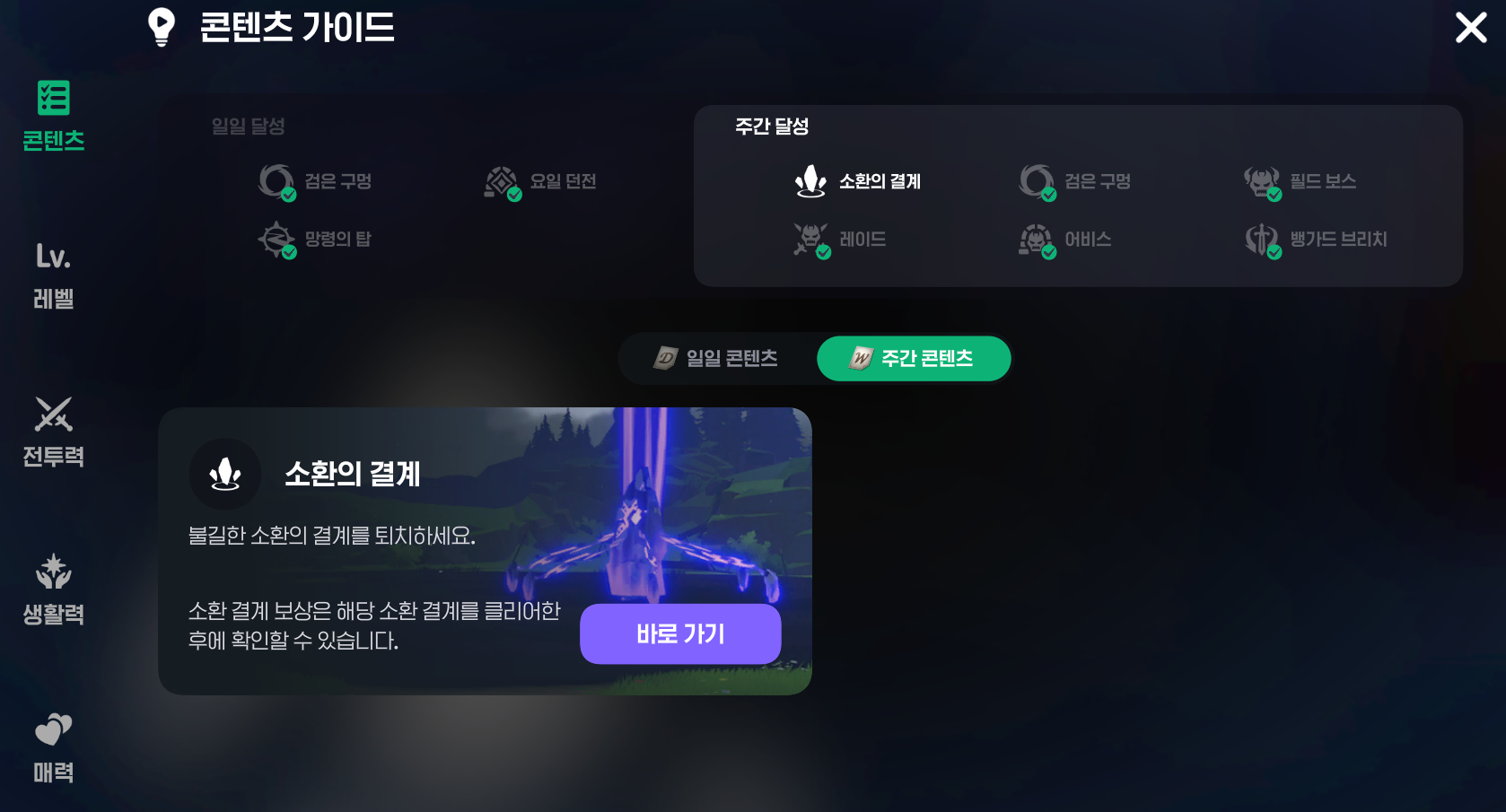
Mabinogi Mobile has a game guide! Stuck on something? Wondering if you've missed anything? Which dungeon should you head to next, and which one's best? Any daily tasks left to do? The game guide answers all of that in one place! I used it all the time as a newbie, and I still do.
A-2 Adventurer Reviews
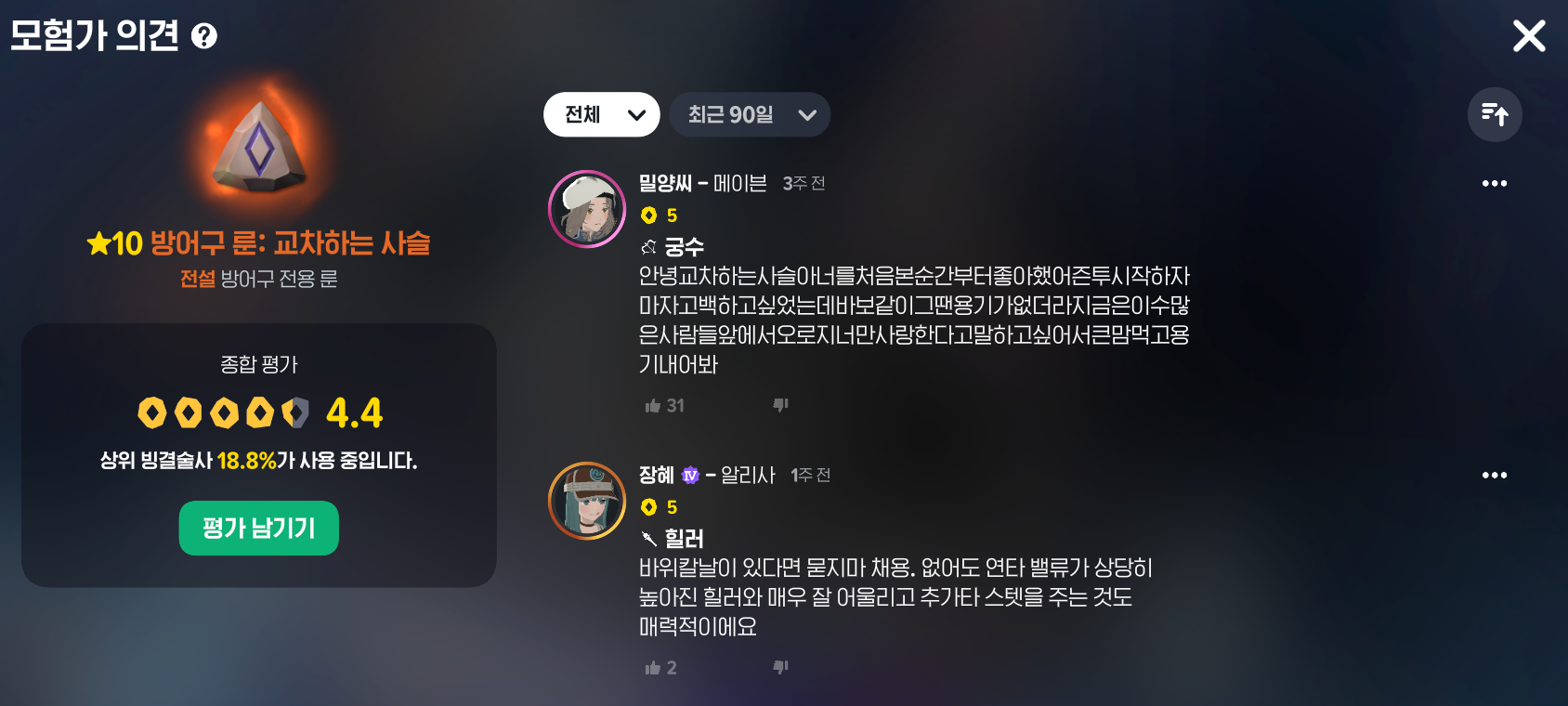
Setting up your runes and wondering when you're supposed to find time to look everything up...? Just tap a rune and check the adventurer reviews!! You can see right away whether other players found it useful, so it's easy to decide which runes to use! Having those reviews right there in-game makes setting up my runes so much easier.
A-3 Double Looting
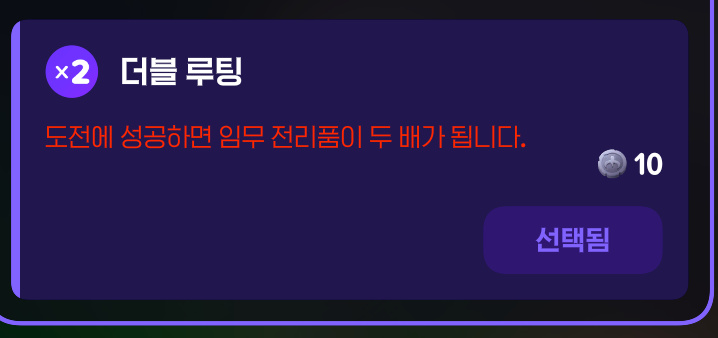
This is so handy for quickly using up all the currency I've piled up on my alts... Honestly, I'd love a 4x option too, but that might be asking a bit much... Still, I'll gladly take double!
A-4 Auto-Move

Just tap a quest! It'll take you to the right location and advance the quest automatically. For someone like me, who's terrible with directions and doesn't really know what they're doing, it's a perfect fit... I somehow still get lost even when I use it, so it's an absolute must for me. I really wish other games had auto-move like this too... It's my favorite feature!!
A-5 Magic Compass
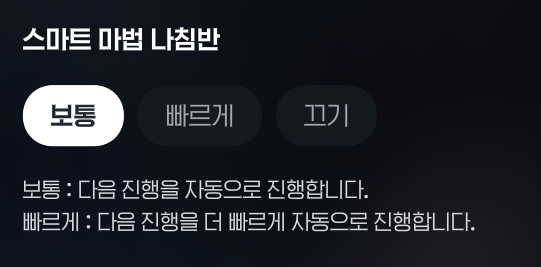
This is a new feature, and it feels like it was made for busy working people who leave the game running but can't keep clicking! Switch it on and leave it alone, and it'll move your character automatically to clear the content!! Normally, after tapping a dungeon, you need to tap again to get your character moving. This is especially useful when you forget that extra tap and wander off to do something else for a bit!! I've been getting a lot of use out of it.
A-6 Class-Specific Armor Recommendations
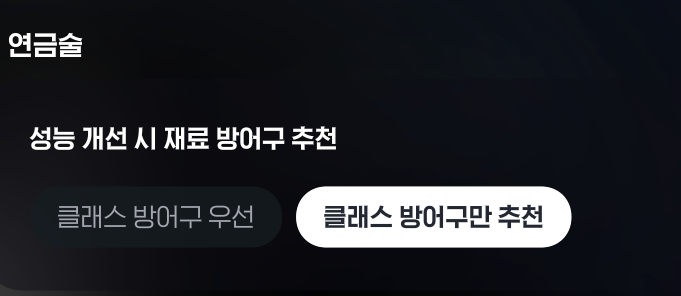
Mabinogi Mobile has three armor types, and the type you use depends on your class. Before, you had to sort them out one by one, improve their stats, and then add them in! Now, just tap the armor-only recommendation option and go straight to improving stats—it'll automatically use the recommended armor for your class!! It's such a time-saver. I definitely spend less time improving stats now!
A-7 Golden Items
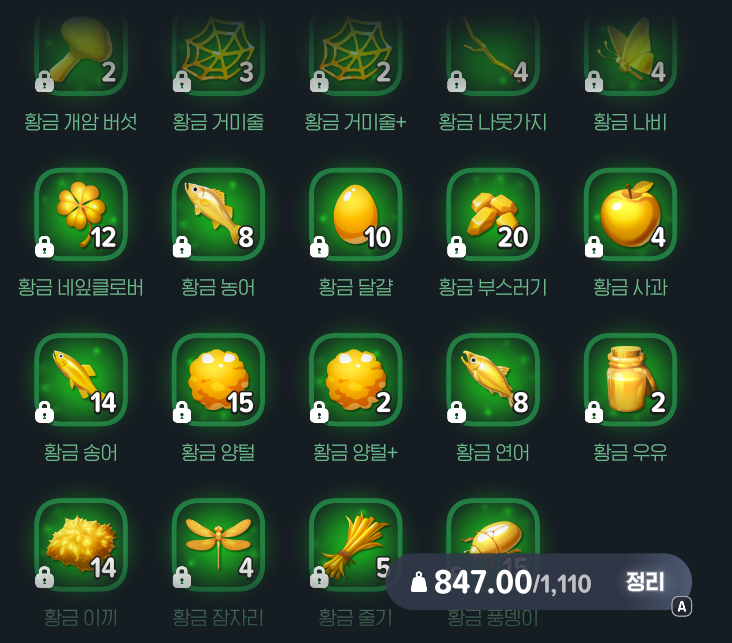
For me, golden items are the game's handiest automation feature! Life skills need all sorts of materials, and a whole lot of them. Golden items let you gather those materials endlessly!! They're really rare, but even one lets you farm its corresponding material indefinitely. You don't have to gather these materials directly, either—there's golden wool available through in-game quests, plus golden items in each town's treasure chests! Haven't gotten a golden item yet? Open the collection log and click on the contents of each town's treasure chests to use one as though you owned it.
A-8 Auto-Combat
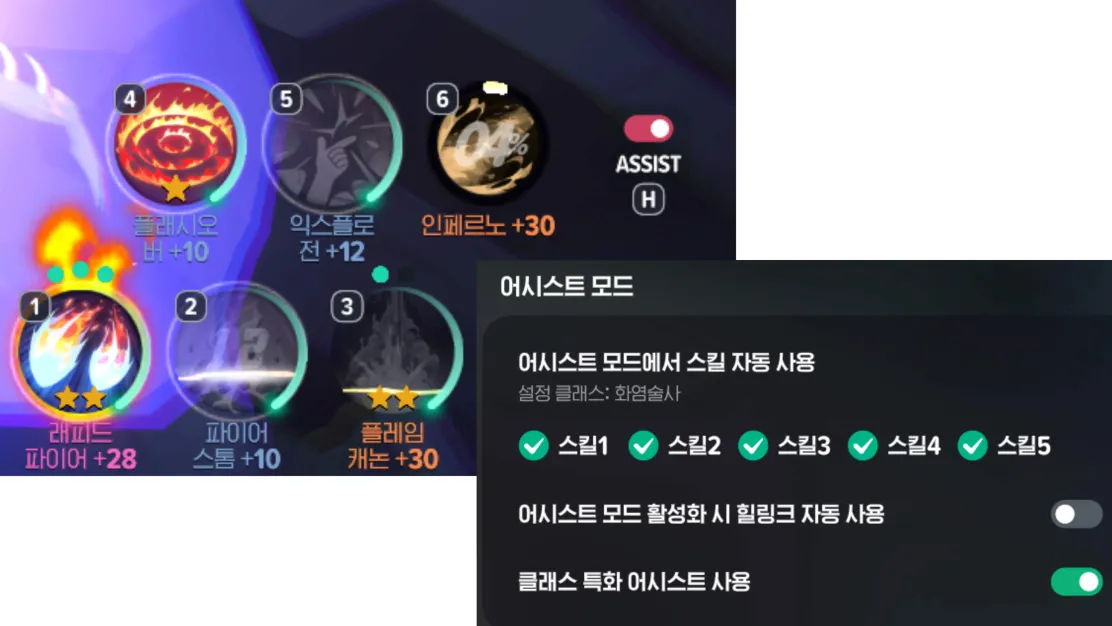
Mabinogi Mobile has auto-combat! It handles your skill rotation for you, which is perfect for people like me who don't really understand combat. If you're in a dungeon or hunting area without mechanics you need to deal with, just turn on auto-combat and it'll take care of all the monsters.
You can still move your character yourself or tap any skill you want while auto-combat is on! I've left it running in dungeons and hunting areas while stepping away or doing something else, then come back to find everything cleared. So convenient! You can also switch individual skills on or off, so there are even class-specific auto-combat setups! This is the feature I use the most.
A-9 Auto-Equip
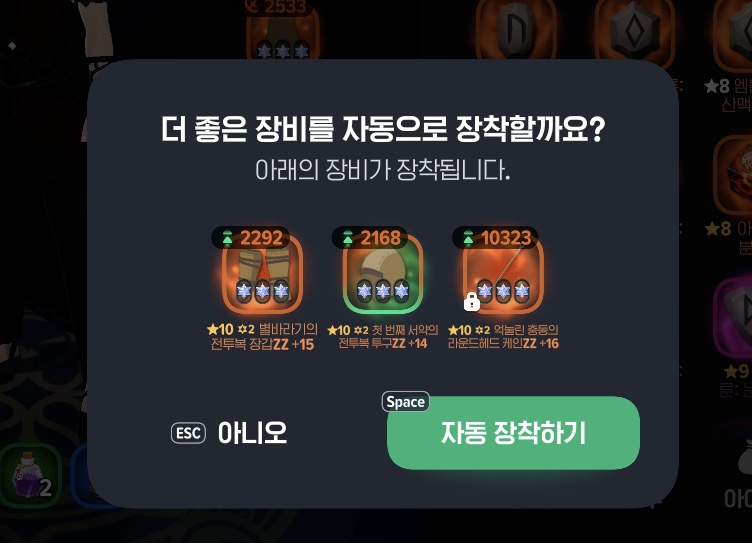
Auto-equip works for equipment, tools, and items! Tap it, and it'll equip the best-performing options you own for your class. It's especially useful when you've got loads of items or several similar ones! Say you have a few tools of the same grade: auto-equip picks the one with the best stats, so you don't have to check each one yourself!
A-10 Guild Ship Training Dummy
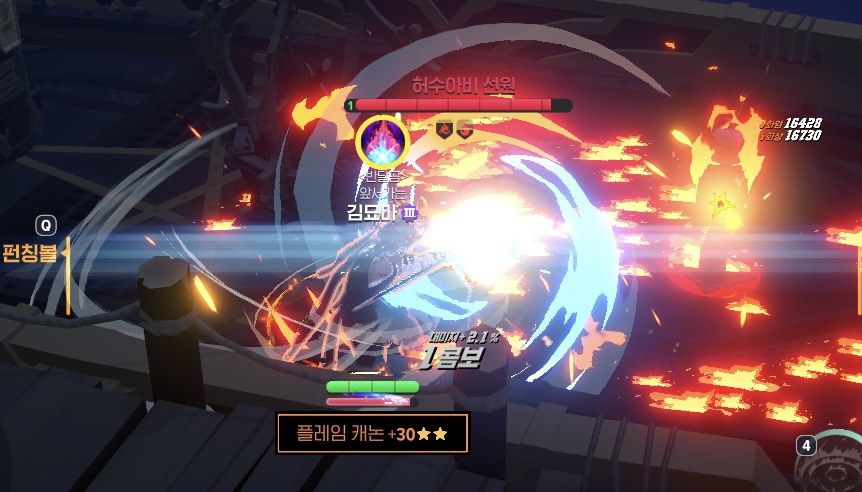
Once you've joined a guild, talk to the cat captain NPC to visit the guild ship, where you'll find a “training dummy.” You can use it to check your damage! Equip the runes you want to try and attack the dummy to see for yourself which works better—and just how much stronger you've gotten.
A lot of classes in Mabinogi Mobile really depend on their damage rotation, and this dummy gives you somewhere to practice! For example, on my Pyromancer, I've seen as much as a 5x damage difference between auto-combat and a proper rotation. That's why having somewhere to practice matters. I really like having a place right in Mabinogi Mobile where I can experiment with my character's class!
A-11 Skill Modification Convenience Feature
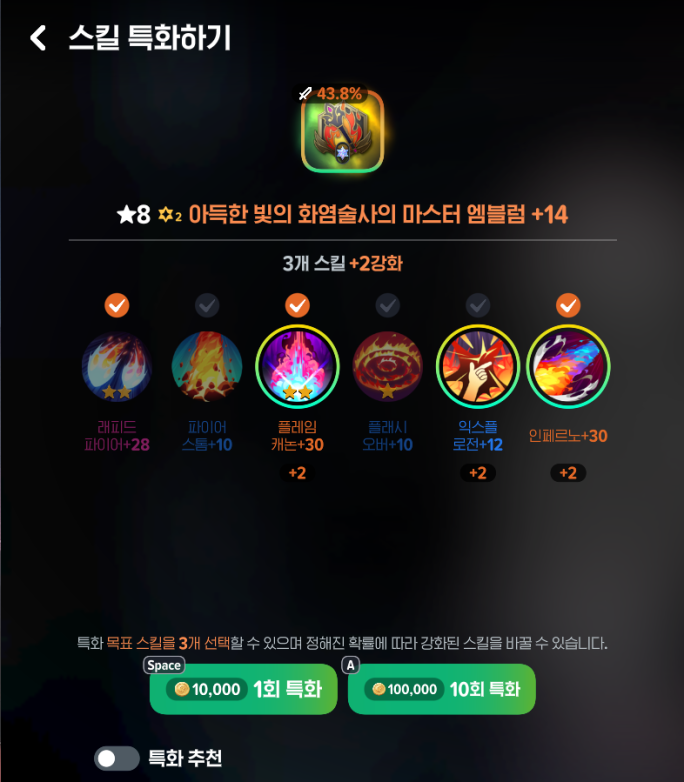
Each class in Mabinogi Mobile has 6 skills, plus a system called skill modification that makes those skills stronger. To boost your damage and skill effects, you need to strengthen the right skills for your class. Modifications cost gold and are random, but there's a handy feature built into the process!
For example, if you only want to modify skills 4, 5, and 6, check 4, 5, and 6 and set it to roll 10 times. It'll stop if skill 4, 5, or 6 gets modified along the way. If none of them does, just repeat the process! Before, you had to keep clicking through rolls one at a time until you got the skill you wanted. Sometimes I'd finally get it, only to click again out of habit and roll right past it... Disaster. The rolls are still random and still cost gold, but now it's much quicker to get the skill modification I want!
A-12 Gem Upgrade System Revamp
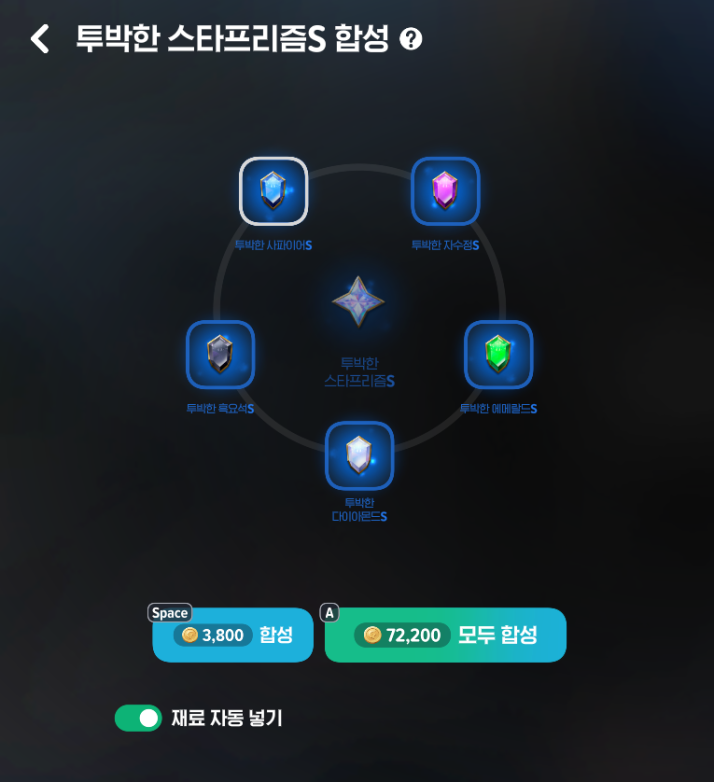
Mabinogi Mobile has gems you can equip on armor, weapons, accessories, and more. The gem upgrade system recently got a much more convenient revamp! Before, it was a two-step process: manually add and upgrade gems one by one, then combine 트리플쿼츠 (3 multicolored gems) and 다크라이트 (diamond + obsidian) to make 스타프리즘. Now, upgrading and combining happen in a single click. It combines the gems into 스타프리즘 automatically, without me having to add each gem myself! That makes the whole process faster and easier.
A Feature I Wish Other Games Had Too
If there's one feature I wish other games had, it's “auto-move” ! I struggle to get around even with a map... I can't figure out how to leave places, and when everything looks similar, I get lost and have no idea where to go. Even in real life, I get caught up in the details and completely miss the big picture. So being able to tap where I want to go and head there automatically was a whole new world for me!
Games that make me navigate using the map myself are such a struggle... A friend recently told me Heartopia was fun and asked me to join them, but I ended up quitting that pretty quickly too. At first, I muddled through despite the awkward navigation. But constantly checking the map to find my way and keep track of where I was got stressful. I ended up quitting less than a month after starting.
That's why auto-move is a must for me, and I really wish other games had it too!
Wrapping Up

Mabinogi Mobile has so many handy features like these! I think making things easier for players helps keep us playing longer. But there's a balance: too many convenience features, and playing stops being fun; too few, and I get worn out and can't keep going. A game needs the right mix of helpful systems and things I can do myself. And I think Mabinogi Mobile does a pretty good job of getting that balance right!!

![[피크 챌린지]몽환적인 숲과 영롱한 BGM, 걷기만 해도 힐링되는 넥슨 '메이플스토리'의 아르카나(Arcana)](https://peak-file.nexon.com/uploads/20260730_0927_31cd59fa.png)
![[피크 챌린지] 와! 엘소드! 직접 조작 맛집이다!](https://peak-file.nexon.com/uploads/20260707_0438_c53e8324.png)
![[피크 챌린지] 초보자도 바로, 쉽게 적응하는 이유 : 마비노기 모바일](https://peak-file.nexon.com/uploads/20260716_1223_baf07890.png)
![[피크 챌린지] 목소리까지 꿈처럼 느껴졌던 메이플스토리 루시드](https://peak-file.nexon.com/uploads/20260629_0328_2212b984.jpg)